REPO thumbnail ideas
for R.E.P.O.: funny, scary, readable.

A good REPO thumbnail mixes the two feelings of the game: funny and scary. Little semibots carrying a fragile vase while the Huntsman listens, a harmless duck turning into the Apex Predator, a full truck at the extraction point. Below: 6 R.E.P.O. thumbnail examples generated with Base.Tube, using the game's robots, monsters and maps, then the colours, five layouts and text that read on a phone.

See all 6 examples or open the R.E.P.O. thumbnail maker

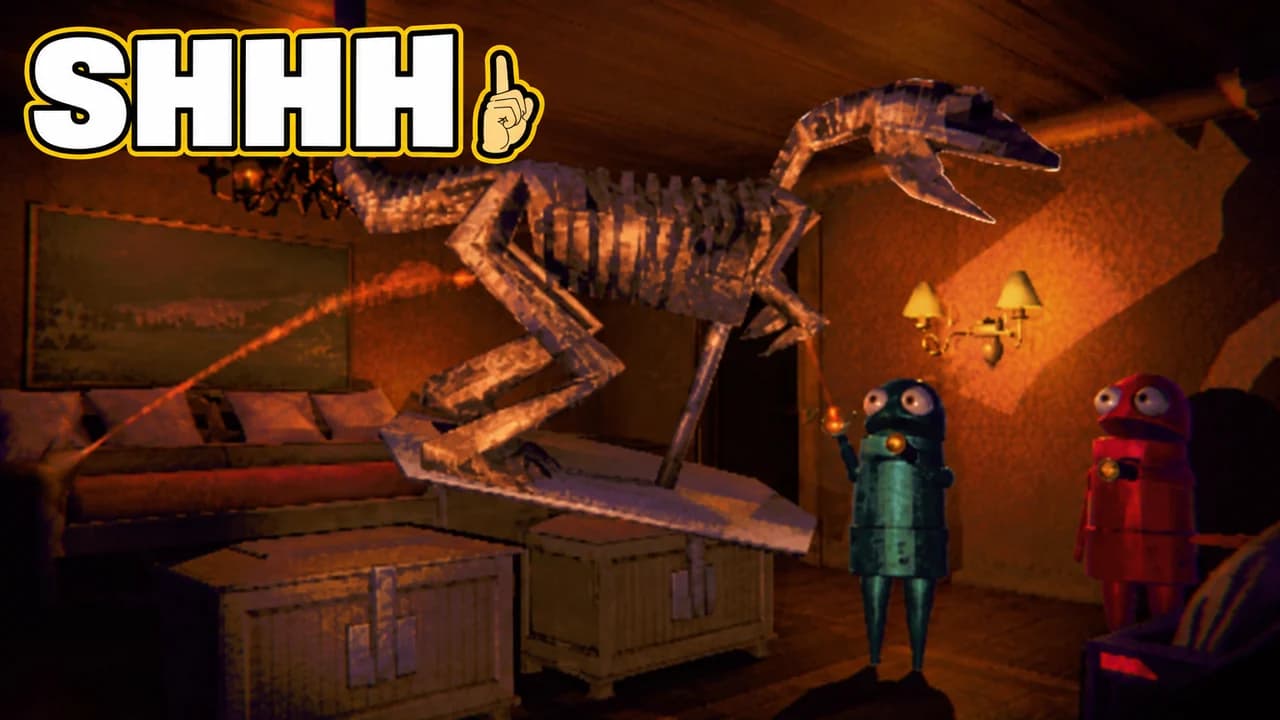
R.E.P.O. thumbnail: two semibots carrying a huge dinosaur skeleton in their grab beams through a dim lodge living room, text SHHH and a finger emoji
Monster behind: carrying a dinosaur without a sound
Examples

6 R.E.P.O.-style thumbnail examples

Every example is generated with Base.Tube in the game's own look, with its real characters and places. No real people, no copied thumbnails. Select one to see the prompt behind it.

  • Monster behind: carrying a dinosaur without a sound
  • Loot disaster: the haul that broke
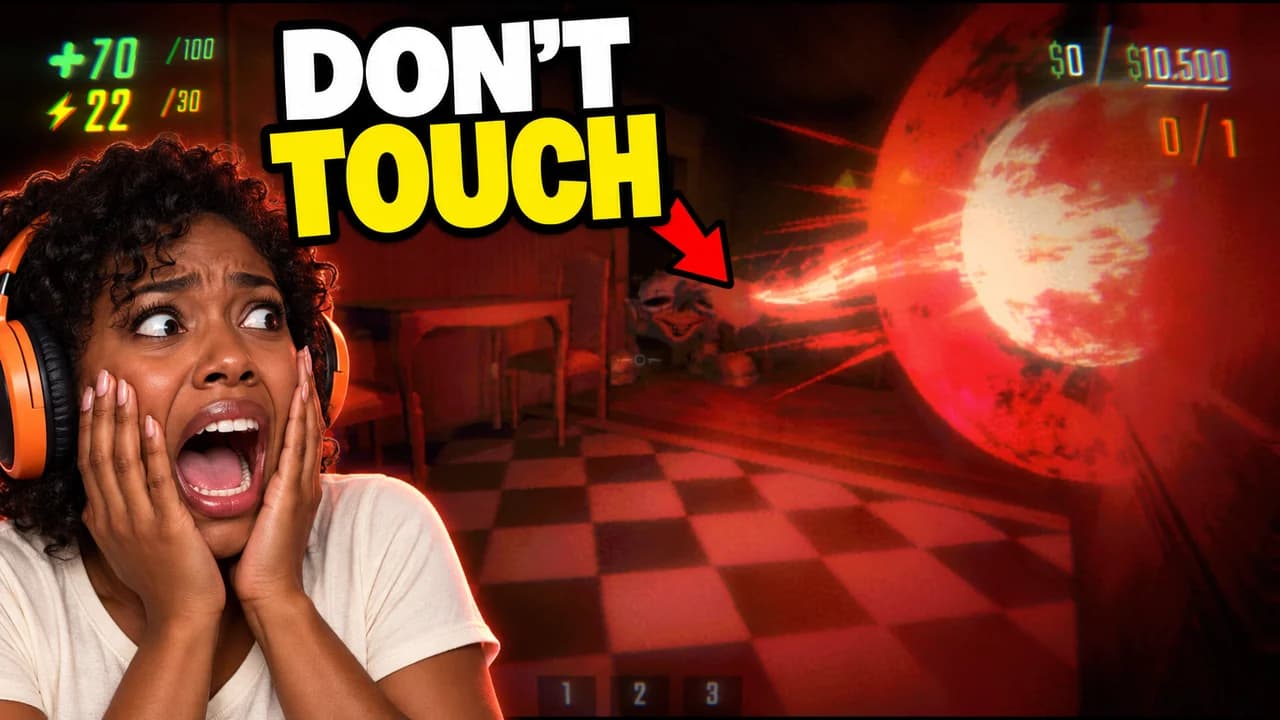
  • Face cam: the one thing you never touch
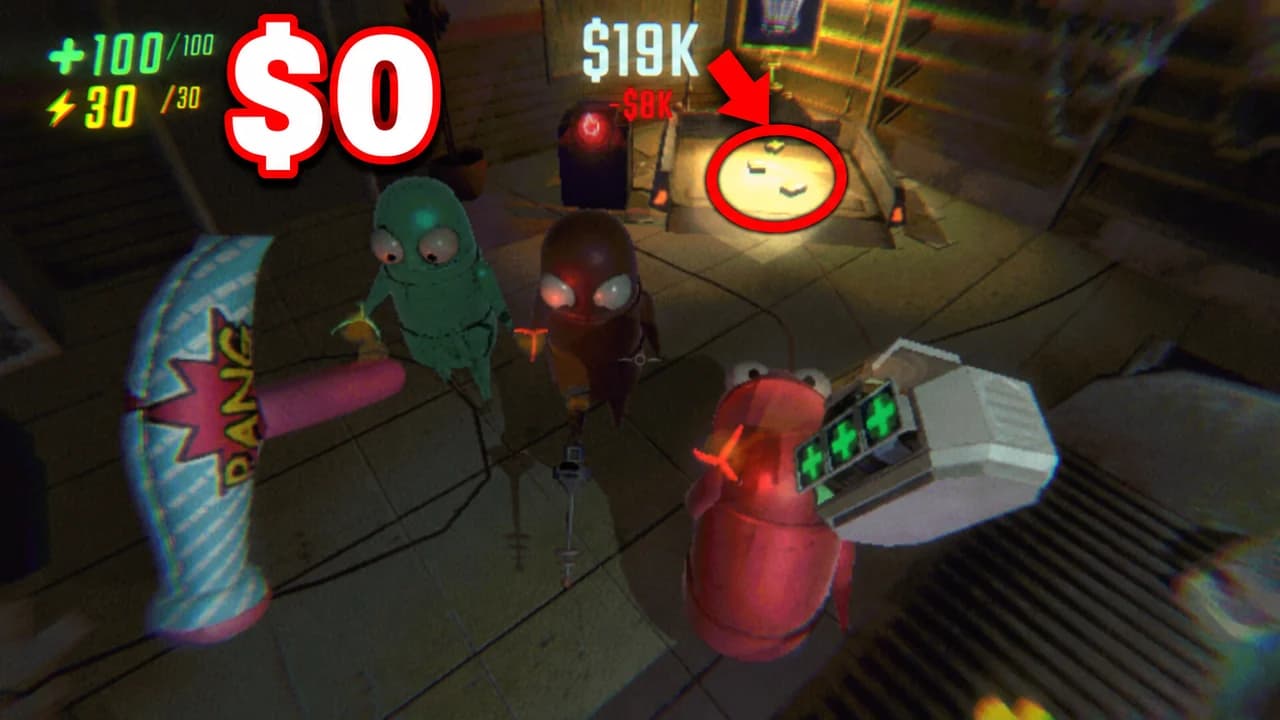
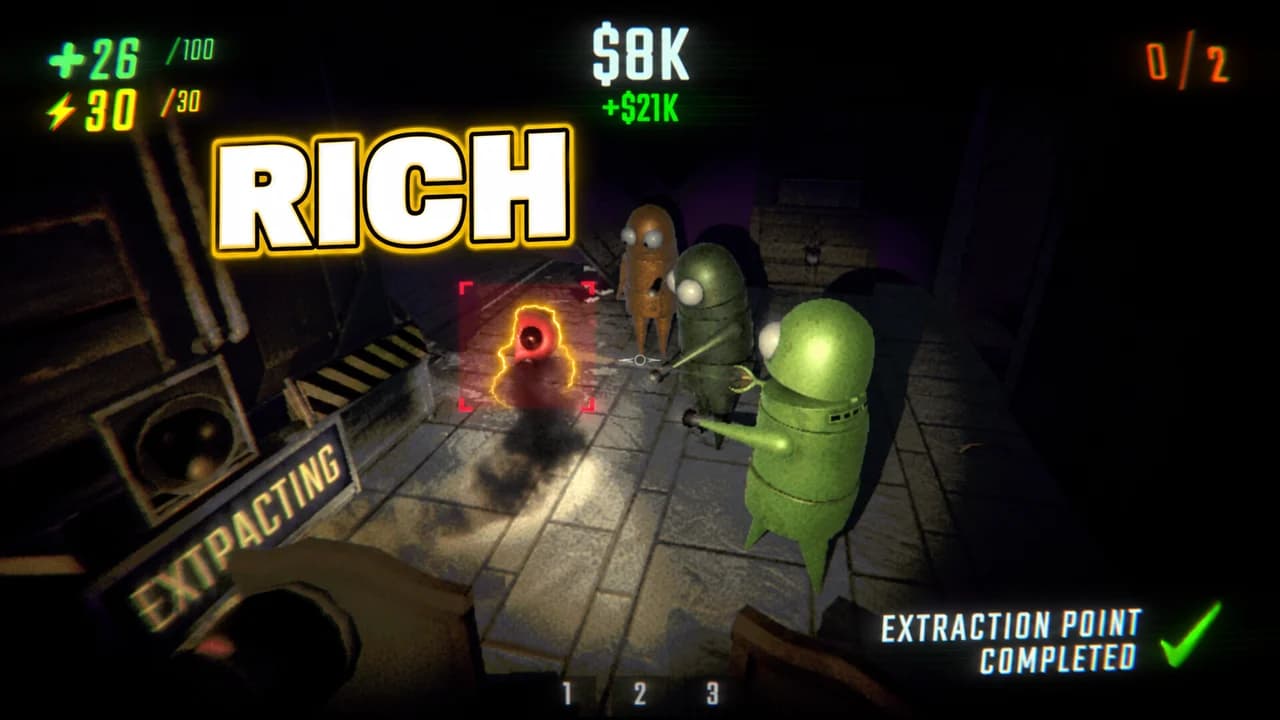
  • Extraction: the biggest haul we ever made
  • Monster close-up: the Headman, no words
  • Monster behind: the Headman is coming
Base.Tube Studio

Make a R.E.P.O.-style thumbnail for your next video.

Describe your video in one line. Base.Tube makes three R.E.P.O. thumbnails in your channel’s style, ready to download and test on YouTube.

  • Three ideas for each video
  • Your face and your channel’s style
  • Change anything in plain words
Generate a R.E.P.O.-style thumbnail (opens in a new tab)
Style recipe

The R.E.P.O. thumbnail style, rule by rule

Palette

  • Semibot orange #FF8A1FThe robots' bodies and the main subject
  • Extraction green #3FE07AThe extraction point, money and successful hauls
  • Monster red #E0322EMonster eyes, danger and broken valuables
  • Haunted navy #141A33Dark corridors and night backgrounds
  • Loot gold #FFC21AValuables, dollar amounts and the main word
  • Outline black #0B0B10Thick text outlines and drop shadows
Composition
One idea per image: a semibot carrying a precious object while a monster appears behind, a monster close-up, a valuable shattering, the team cheering at the extraction point. Keep the robots large and their expressive eyes visible. Keep the bottom-right corner empty, because YouTube shows the video length there.
Text
Zero to three words in capitals, in a heavy rounded or slightly wobbly font, white or gold with a thick black outline. A dollar amount or "RUN" often says enough.
Faces & expressions
Semibots show emotion through their eyes and their floppy poses: wide eyes in panic, squinting while they sneak, flailing while they fall. A face cam of the creator reacting next to the game adds the scream or the laugh.
Background
A real level: the dark halls of Headman Manor, the snowy McJannek Station, the corridors of Swiftbroom Academy. Mostly dark navy with one light on the robots, or the warm light of the extraction point for wins.
Props & details
  • The grab beam lifting a valuable
  • Fragile valuables like vases, paintings and pianos, with their value
  • The extraction point and its money goal
  • Monsters like the Huntsman, the Headman, the Apex Predator duck and the Clown
  • Red arrows and circles on the key detail
Layout recipes

Five layouts for R.E.P.O. thumbnails

  1. Monster Behind

    A semibot busy with loot, unaware of the monster right behind them. The viewer sees the danger before the robot does. For horror moments and funny deaths.

    Prompt idea16:9 YouTube thumbnail for a R.E.P.O. video: a small semibot carrying a valuable with the grab beam, a monster looming right behind it in a dark corridor, red eyes, short text, keep the bottom-right corner clear, be creative with the composition

    Generate a Monster Behind layout in the Base.Tube Studio (new tab)
  2. Loot Disaster

    A valuable breaking at the worst moment: a vase shattering, a piano falling, the money counter dropping. For fail and "we lost everything" videos.

    Prompt idea16:9 YouTube thumbnail for a R.E.P.O. video: a precious valuable shattering in mid-air, semibots in panic, the value dropping in red numbers, short text, keep the bottom-right corner clear, be creative with the composition

    Generate a Loot Disaster layout in the Base.Tube Studio (new tab)
  3. Extraction

    The win: the team at the extraction point with the money goal reached, or one last robot sprinting in with the loot. Made for "biggest haul" and progress videos.

    Prompt idea16:9 YouTube thumbnail for a R.E.P.O. video: semibots cheering at the glowing extraction point, money goal reached, valuables piled up, warm light, a gold dollar amount, keep the bottom-right corner clear, be creative with the composition

    Generate a Extraction layout in the Base.Tube Studio (new tab)
  4. Face Cam

    A creator's face screaming or laughing next to the game. Use your own face; our examples use an invented streamer.

    Prompt idea16:9 YouTube thumbnail for a R.E.P.O. video: an invented streamer with a headset screaming on one side, a scary R.E.P.O. monster moment on the other, short text, keep the bottom-right corner clear, be creative with the composition

    Generate a Face Cam layout in the Base.Tube Studio (new tab)
  5. Monster Close-Up

    One monster huge, filling the frame. For monster guides, "how to survive" videos and tier lists.

    Prompt idea16:9 YouTube thumbnail for a R.E.P.O. video: one R.E.P.O. monster in a huge close-up, a tiny semibot in the corner for scale, dark background with one light, one or two words, keep the bottom-right corner clear, be creative with the composition

    Generate a Monster Close-Up layout in the Base.Tube Studio (new tab)

What makes a R.E.P.O. thumbnail work

R.E.P.O. is a co-op horror game where small, wobbly robots carry fragile valuables through haunted places while monsters hunt them. The best videos are both funny and scary, and the best thumbnails show both at once: a robot proud of its vase, and a monster right behind it.

Many viewers see your thumbnail small: on a phone, in the sidebar, on a TV. Dark horror scenes fall apart at that size and turn into black rectangles. One strong light, big robots and a clear monster survive. Every rule on this page follows from that.

Funny and scary in the same frame

The core image of R.E.P.O. is the contrast between a cute, clumsy semibot and a terrifying monster. Put both in the frame. The robot is busy with its loot, the monster is close, and the viewer sees the danger before the robot does. That small story makes people click to see what happens next.

Let the eyes do the acting

Semibots have no mouths, but their eyes and their floppy bodies are very expressive. Wide eyes for panic, squinting eyes for sneaking, a limp body flying through the air for a funny death. Make the robots large enough that the eyes read at phone size. If your channel shows your face, a face cam screaming or laughing next to the game adds the human reaction.

Five layouts, one per video type

Most R.E.P.O. videos fit one of five shapes:

  • Monster behind: a robot with loot, a monster right behind it.
  • Loot disaster: a valuable shattering and the value dropping.
  • Extraction: the team at the extraction point with the money goal.
  • Face cam: your reaction next to the scariest or funniest moment.
  • Monster close-up: one monster huge, for guides and tier lists.

Pick the layout that matches the promise of your video, then change the monster, the valuable and the words.

Colours: dark, with one light

The levels are dark, so the thumbnail is mostly navy. Put one strong light on the subject: warm lamp light for sneaking, red for the monster's eyes, green and gold for the extraction point and money. A frame that is all dark loses against brighter thumbnails in the feed.

Text: a word or a number

Three words is the limit. Short warnings work well ("RUN", "SHHH", "BEHIND YOU"), and a dollar amount says everything for haul and disaster videos. Use a heavy rounded font with a thick black outline. See the YouTube thumbnail fonts guide for options.

A REPO thumbnail background

Use a real level: Headman Manor, McJannek Station or Swiftbroom Academy. Keep it dark and slightly blurred so the robots and the monster stay in front. More ideas in the YouTube thumbnail backgrounds guide.

Size and checks

Upload at 1280 × 720 pixels, in 16:9. For file size and format limits, see the YouTube thumbnail size guide. Keep the bottom-right corner empty, where YouTube shows the video length. Then put your thumbnail next to other R.E.P.O. videos in the YouTube thumbnail preview and compare versions with the thumbnail tester. No tool can predict how many people will click before a video is live. When you connect your channel, Base.Tube shows the real impressions and click-through rate of each video.


Checklist

Do this, not that

Do

  • Mix the funny and the scary; that contrast is what R.E.P.O. fans click for.
  • Keep the semibots' eyes visible; they carry all the emotion.
  • Show the valuable and its value when the video is about money or breaking things.
  • Keep the text to three words or fewer, or one dollar amount.
  • Leave the bottom-right corner clear for the video length.

Don't

  • Don't make the whole frame dark; give the robots and the monster one strong light.
  • Don't show four robots and three monsters at once; pick one moment.
  • Don't hide the monster so well that viewers cannot see it at phone size.
  • Don't use thin fonts or small text; they disappear on a phone.
FAQ

Questions about R.E.P.O. thumbnails

What makes a good REPO thumbnail?
One moment that is funny and scary at the same time: a robot carrying a vase while a monster stands behind it, a piano shattering, the duck turning into the Apex Predator. Show the robots large with their eyes visible, give the scene one strong light, and add one to three words.
What is a good REPO thumbnail background?
A real level from the game, mostly dark: the halls of Headman Manor, the snowy McJannek Station or the corridors of Swiftbroom Academy. Keep it navy and blurred with one warm light on the robots. For wins, use the glow of the extraction point instead.
What font works for R.E.P.O. thumbnails?
A heavy, rounded, all-caps font with a thick black outline fits the game's cute-and-creepy look. Free fonts with that feel include Luckiest Guy, Lilita One and Creepster, all on Google Fonts. Keep spooky fonts for one or two words only, and very large.
How do I make a R.E.P.O. thumbnail for a funny moment?
Freeze the second before or during the disaster: the vase in mid-air, the monster right behind the unaware robot, the duck changing shape. The viewer should understand the joke before reading the title. A face cam laughing or screaming next to it doubles the effect.
How do I make a REPO thumbnail?
Decide what the video promises: a monster, a haul, a disaster or a funny death. Capture or generate that moment with the robot and the monster or the loot large in the frame, add one to three words in a heavy outlined font, export at 1280 × 720 pixels and compare it in a feed preview.
Is there a free REPO thumbnail maker?
Any free image editor works if you follow the rules on this page. If you would rather describe your video and get options, the Base.Tube Studio generates R.E.P.O. thumbnails: pick one of the five layouts, say what happened in your run, and keep the version you like.
Base.Tube Studio

Make a R.E.P.O.-style thumbnail
for your next video.

Describe your video, pick a layout, and generate options in the Base.Tube Studio. Once the video is live, connect your channel to see its real impressions and click-through rate.