Marvel Rivals thumbnail ideas
that hit like an ultimate.

A good Marvel Rivals thumbnail shows one hero doing one thing: Jeff swallowing a whole team, Hulk landing an ultimate, Groot walling off a point. Below: 6 examples generated with Base.Tube using the game's real heroes, maps and HUD, then the style rules, five layouts and a quick way to make your own.

See all 6 examples or open the Marvel Rivals thumbnail maker

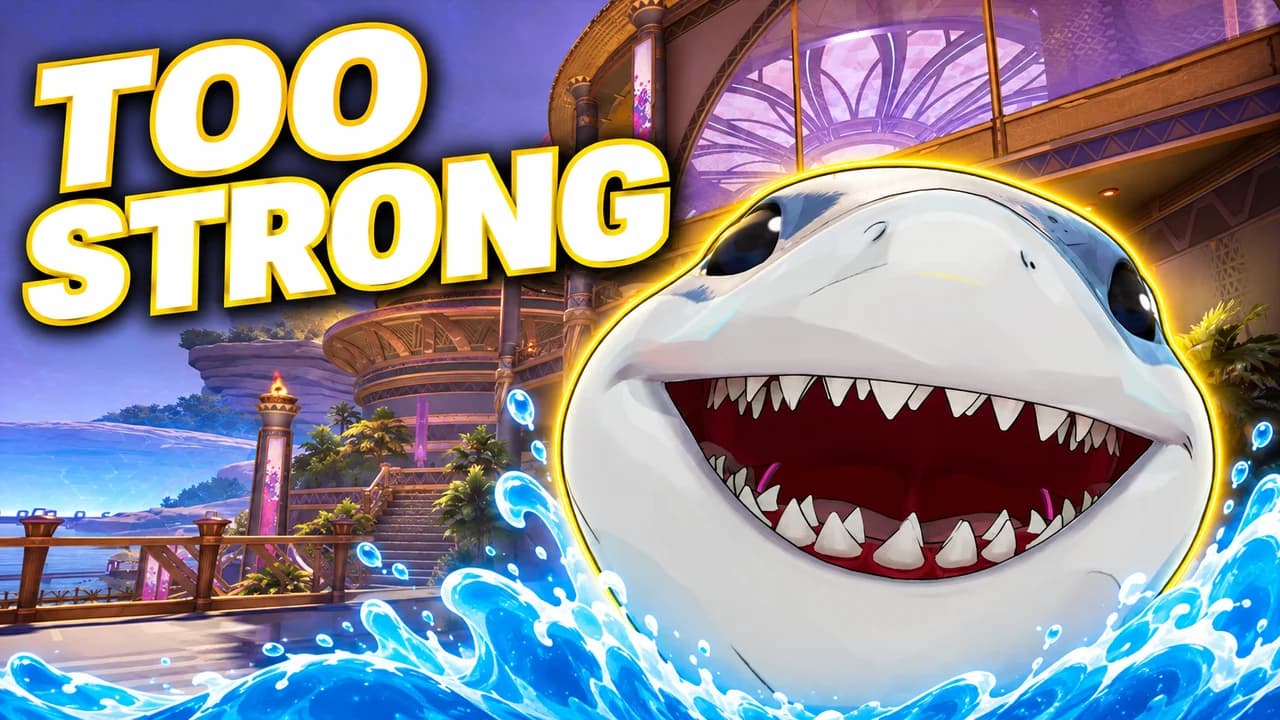
Marvel Rivals thumbnail: Jeff the Land Shark grinning as he bursts out of a blue water splash by a seaside palace terrace, text TOO STRONG
Hero spotlight: Jeff is too strong
Examples

6 Marvel Rivals-style thumbnail examples

Every example is generated with Base.Tube in the game's own look, with its real characters and places. No real people, no copied thumbnails. Select one to see the prompt behind it.

  • Hero spotlight: Jeff is too strong
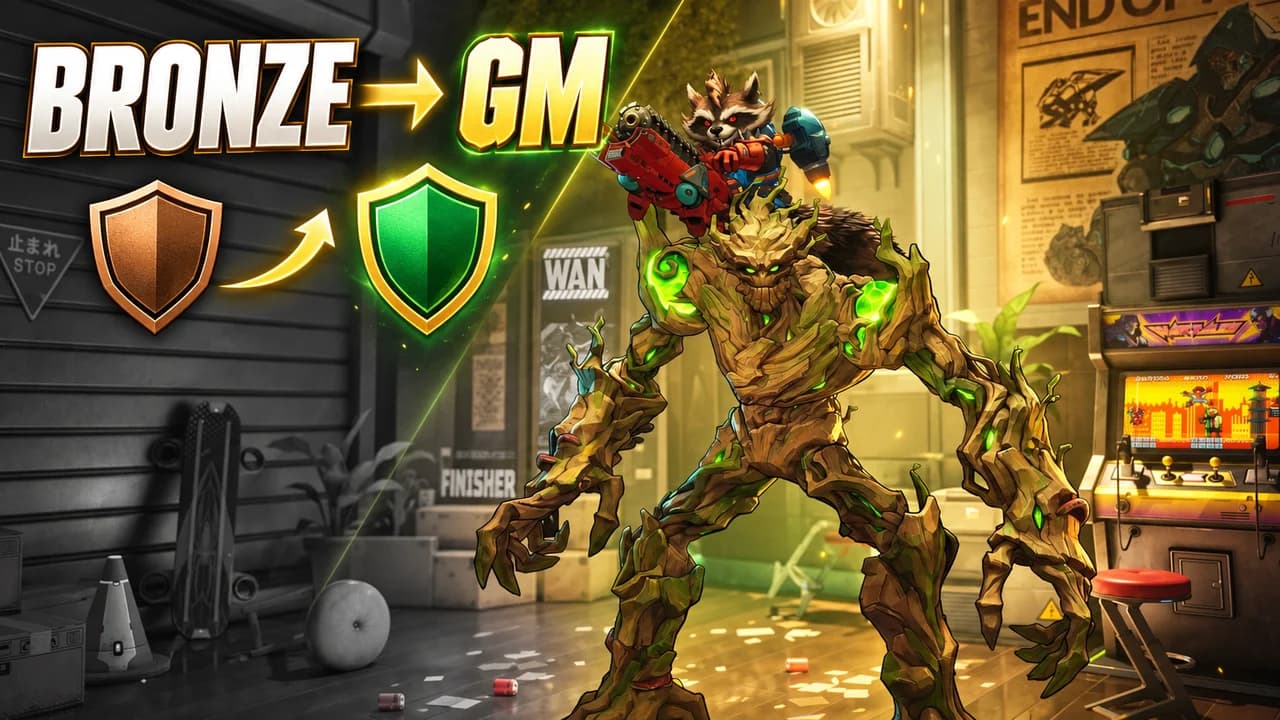
  • Rank climb: Bronze to Grandmaster with Groot and Rocket
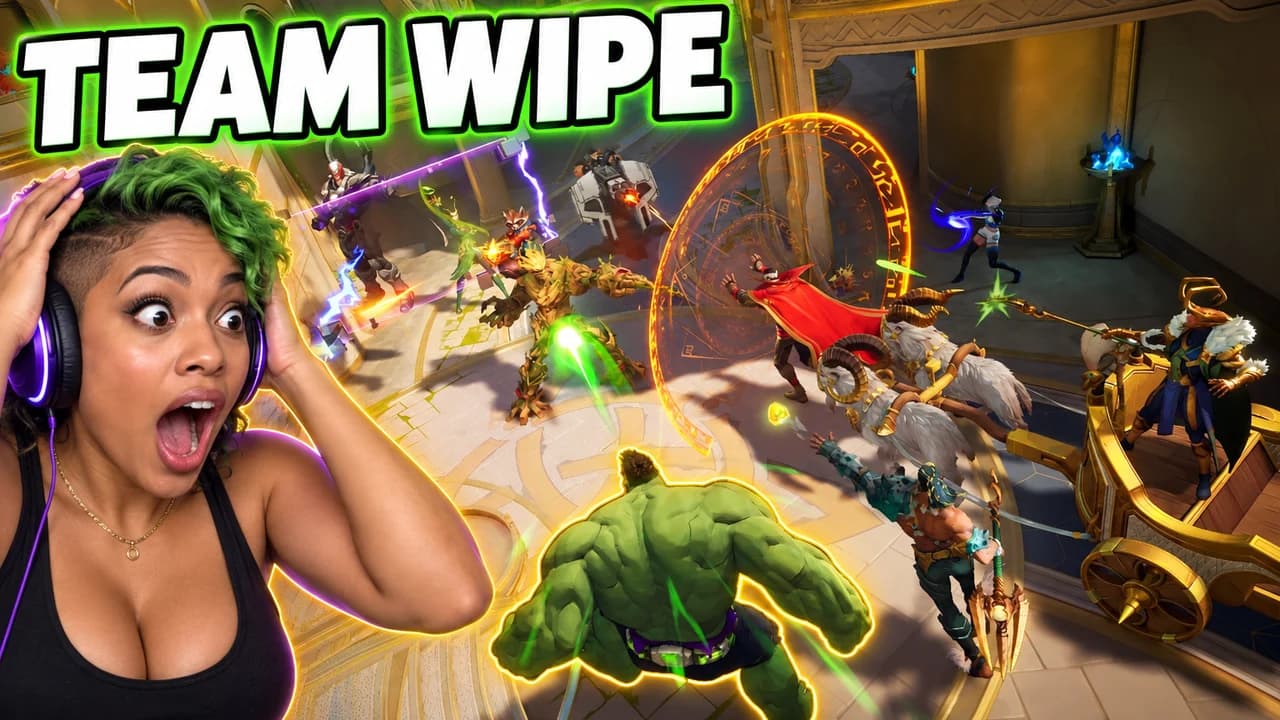
  • Face cam: Hulk jumps into the whole team
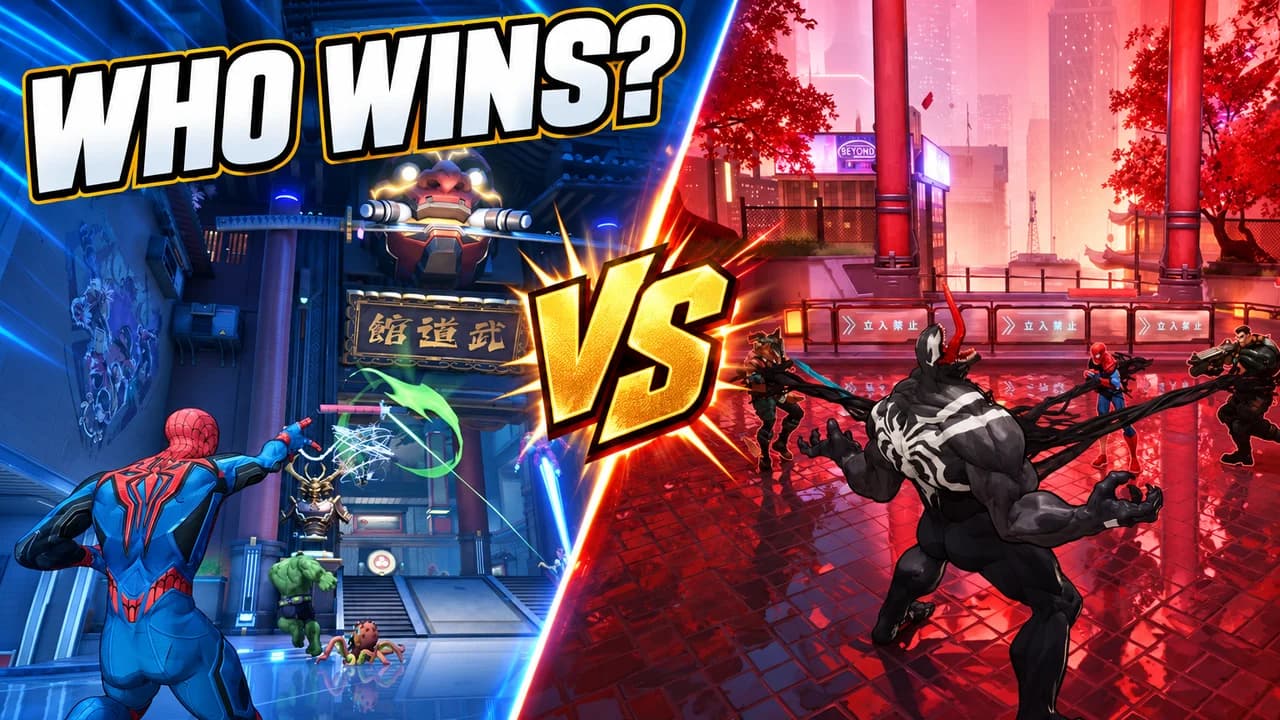
  • Versus: Spider-Man against Venom
  • Team-up: Hulk powers up Iron Man
  • Hero spotlight: Loki and his illusions
Base.Tube Studio

Make a Marvel Rivals-style thumbnail for your next video.

Describe your video in one line. Base.Tube makes three Marvel Rivals thumbnails in your channel’s style, ready to download and test on YouTube.

  • Three ideas for each video
  • Your face and your channel’s style
  • Change anything in plain words
Generate a Marvel Rivals-style thumbnail (opens in a new tab)
Style recipe

The Marvel Rivals thumbnail style, rule by rule

Palette

  • Rivals yellow #FFD21FThe main word and the ultimate glow
  • Comic red #E3262EEnemy outlines, damage and versus sides
  • Hero blue #1D6CF2Allied side, skies and calm backgrounds
  • Ultimate purple #8A3CFFMagic, portals and high-stakes moments
  • Ink black #0C0C12Comic outlines, text outlines and shadows
Composition
One hero, large and in action, cut at the waist or the chest, with a real Marvel Rivals map behind. Show a piece of the game's interface (the ultimate charge, the kill feed, the rank badge, the MVP screen) so the game is recognised at once. Keep the bottom-right corner clear for the video length.
Text
One to three words in heavy italic capitals, yellow or white with a thick black outline and a slight tilt, like a comic sound effect. Never a block of patch notes.
Faces & expressions
Heroes in their signature pose or ultimate: Hulk roaring, Spider-Man mid-swing, Loki smirking. On face-cam thumbnails the creator reacts with one big emotion next to the game.
Background
A real map: the golden halls of Yggsgard, the neon streets of Tokyo 2099, the skyline of Wakanda. Blur it slightly or add a comic halftone so the hero stands out.
Props & details
  • The ultimate charge ring at 100%
  • The kill feed showing a team wipe
  • Rank badges from Bronze to Grandmaster and above
  • Team-up icons and glowing abilities
  • Red arrows and circles on the key detail
Layout recipes

Five layouts for Marvel Rivals thumbnails

  1. Hero spotlight

    One hero shown big, using the ability the video is about. Made for guides, tier lists, "broken hero" and new hero videos.

    Prompt idea16:9 YouTube thumbnail for a Marvel Rivals video: one real hero huge in the frame using their signature ability on a real map, comic-book colours and outlines, short text in yellow, keep the bottom-right corner clear, be creative with the composition

    Generate a Hero spotlight layout in the Base.Tube Studio (new tab)
  2. Rank climb

    Before and after in one frame: a low rank badge on one side, a high one on the other, the same hero in the middle. Made for ranked and "zero to Grandmaster" videos.

    Prompt idea16:9 YouTube thumbnail for a Marvel Rivals video: split before/after, a grey Bronze rank badge on the left, a glowing high rank badge on the right, the same hero between them, short text, keep the bottom-right corner clear, be creative with the composition

    Generate a Rank climb layout in the Base.Tube Studio (new tab)
  3. Face cam

    The creator reacting next to the game: a team wipe, a clutch, a funny fail. Use your own face; our examples use an invented streamer.

    Prompt idea16:9 YouTube thumbnail for a Marvel Rivals video: an invented streamer with a headset reacting in shock on one side, a big Marvel Rivals ultimate on the other, kill feed visible, short text, keep the bottom-right corner clear, be creative with the composition

    Generate a Face cam layout in the Base.Tube Studio (new tab)
  4. Versus

    Two heroes face to face in a split frame, each in its own colour. Works for matchups, counters and "who is better" videos.

    Prompt idea16:9 YouTube thumbnail for a Marvel Rivals video: two real heroes face to face in a split frame, one side red, one side blue, a VS in the middle, text WHO WINS?, keep the bottom-right corner clear, be creative with the composition

    Generate a Versus layout in the Base.Tube Studio (new tab)
  5. Team-up

    Two heroes combining their powers: the team-up glow between them and the result in action. Made for duo, combo and team comp videos.

    Prompt idea16:9 YouTube thumbnail for a Marvel Rivals video: two real heroes using a team-up ability together, energy flowing between them, enemies flying, comic colours, short text, keep the bottom-right corner clear, be creative with the composition

    Generate a Team-up layout in the Base.Tube Studio (new tab)

What makes a Marvel Rivals thumbnail work

Marvel Rivals is loud, fast and full of heroes everyone already knows. That helps your thumbnail: a viewer recognises Hulk, Spider-Man or Groot in a fraction of a second. The thumbnails that stand out use that recognition and add one thing: what the hero is doing in this video.

Most viewers see your thumbnail small, on a phone or in a sidebar, next to other hero shooter videos. Big shapes, one hero and strong colour survive at that size. A screenshot of a six-versus-six team fight does not.

One hero, one action

Pick the hero the video is about and make it large. Then show the ability that matters: Jeff's ultimate swallowing enemies, Groot's walls, Loki's illusions, Hulk landing in the middle of a team. A hero standing still with no situation is just character art; a hero in action is a promise.

For versus and team-up videos, use two heroes and no more. Give each one its own colour and its own side of the frame.

Comic-book energy

The game borrows from the comics, and so should your thumbnail. Thick outlines, a slight halftone in the sky, tilted text that reads like a sound effect. Pick one accent colour: yellow for the ultimate glow and the main word, red for enemies and damage, purple for magic and portals. Keep the rest of the frame calm so the accent does the work.

Show the game's interface

A piece of the real HUD tells fans this is Marvel Rivals and not a comic cover: the ultimate charge at 100%, a kill feed full of eliminations, a rank badge, the MVP screen at the end of the match. It also sets the stakes. A kill feed with six names in it says "team wipe" without any text.

Five layouts for five kinds of video

Most Marvel Rivals videos fit one of five shapes: hero spotlight, rank climb, face cam, versus or team-up. The layout recipes above give the structure of each. Guides and "broken hero" videos suit the hero spotlight. Ranked journeys suit the rank climb. Reactions suit the face cam. Matchups suit versus, and duo strategies suit the team-up.

Text: three words, tilted

Use one to three words in heavy italic capitals, yellow or white, with a thick black outline. TOO STRONG, TEAM WIPE, BRONZE → GM: the text adds what the image cannot say, never the full title. To compare heavy display fonts, see the YouTube thumbnail fonts guide.

A Marvel Rivals thumbnail background

The background is a real map, chosen for the hero: Yggsgard for Thor, Loki and Hela, Tokyo 2099 for Spider-Man and Venom, Wakanda for Black Panther. Blur it slightly or darken the edges so the hero stays in front. More ideas in the YouTube thumbnail backgrounds guide.

Size and checks

Upload at 1280 × 720 pixels, in 16:9; for file limits see the YouTube thumbnail size guide. Keep the bottom-right corner clear for the video length. Then put your thumbnail next to other videos in the YouTube thumbnail preview and compare versions with the thumbnail tester.

No tool can predict how many people will click before a video is live. The real answer comes from YouTube. When you connect your channel, Base.Tube shows the real impressions and click-through rate of each video.


Checklist

Do this, not that

Do

  • Show one hero, big, in the ability the video is about.
  • Show a real piece of the game, like the ultimate charge, the kill feed or a rank badge.
  • Use comic-book energy, with thick outlines, tilted text and one strong colour.
  • Keep the text to three words or fewer.
  • Leave the bottom-right corner clear for the video length.

Don't

  • Don't put a whole team of six heroes in one image; nobody reads it at phone size.
  • Don't fill the frame with patch-note text and ability numbers.
  • Don't show a hero standing still with no situation; give it an action.
  • Don't use thin fonts or small text; they disappear on a phone.
FAQ

Questions about Marvel Rivals thumbnails

What makes a good Marvel Rivals thumbnail?
One hero, one action and one to three words. Show the hero large, in the ability or ultimate the video is about, on a real map, with a piece of the interface such as the kill feed or a rank badge. Check it at phone size: if the hero is not clear in one second, cut something.
How do I make a Marvel Rivals ranked thumbnail?
Show the climb in one frame: the low rank badge on one side, the high one on the other, and the hero you climbed with in the middle. Make the low side grey and the high side glow. The two rank names, such as BRONZE → GM, are often all the text you need.
What is a good Marvel Rivals thumbnail background?
A real map that matches the hero or the video: the golden halls of Yggsgard for Asgardian heroes, the neon streets of Tokyo 2099 for Spider-Man and Venom, Wakanda for Black Panther. Blur it slightly or add a comic halftone so it stays behind the hero.
What font do Marvel Rivals thumbnails use?
Most use a heavy, italic, all-caps display font with a thick black outline and a slight tilt, like a comic sound effect. Free fonts with a similar feel include Bangers, Anton and Luckiest Guy on Google Fonts. Size and outline matter more than the exact font.
Is there a free Marvel Rivals thumbnail maker?
You can build one by hand in any free image editor with the rules on this page. If you would rather describe your video and get options, the Base.Tube Studio makes Marvel Rivals thumbnails from one line about your video: pick a layout, say what happens, and keep the version you like.
Which hero should I put on my thumbnail?
The hero the video is about, alone if possible. For team-ups and matchups, two heroes in a split frame. If your video covers many heroes, like a tier list, show your top pick large and let the rest stay small or out of the frame.
Base.Tube Studio

Make a Marvel Rivals-style thumbnail
for your next video.

Describe your video, pick a layout, and generate options in the Base.Tube Studio. Once the video is live, connect your channel to see its real impressions and click-through rate.