Rocket League thumbnail ideas
that hit like a flip reset.

A good Rocket League thumbnail shows one shot: the flip reset into the top corner, the save at zero seconds, the climb from Bronze to Supersonic Legend. One car, one ball, one to three words. Below: 6 examples generated with Base.Tube using the game's real cars, arenas and interface, then the style rules, five layouts and a quick way to make your own.

See all 6 examples or open the Rocket League thumbnail maker

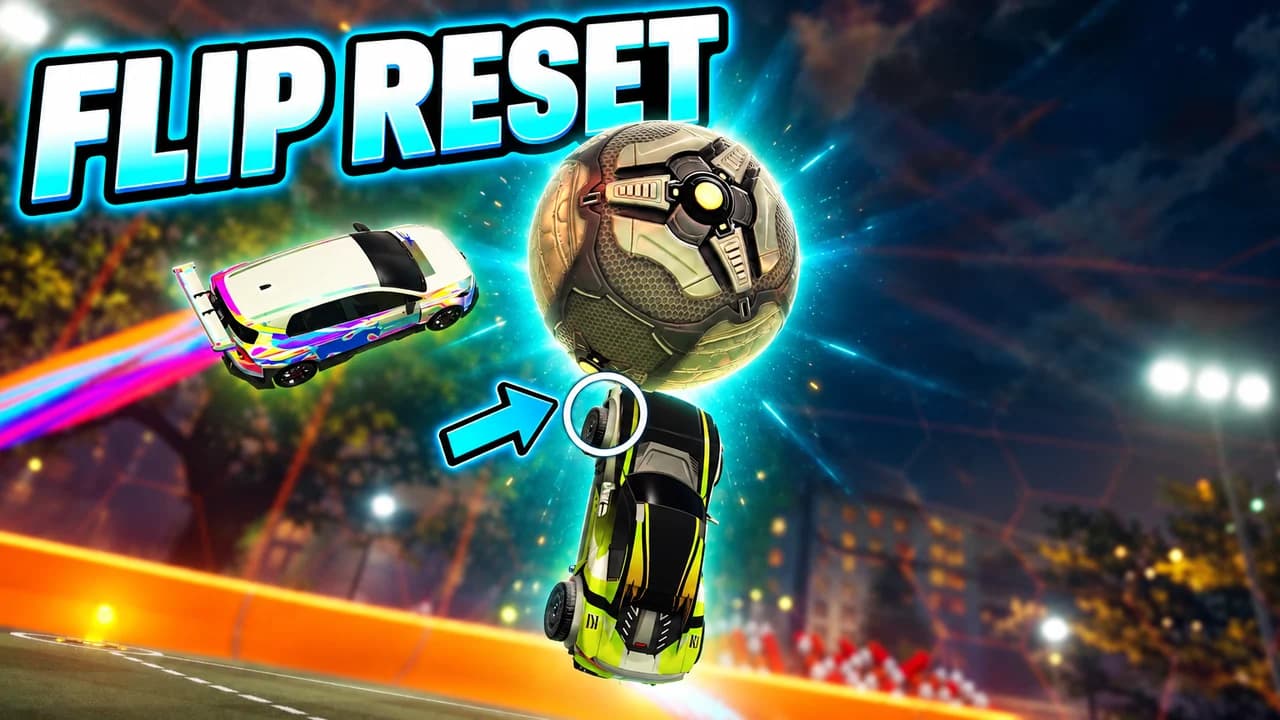
Rocket League thumbnail: a yellow car upside down in the night sky touching the ball with its wheels, a blue arrow, a rainbow car, text FLIP RESET
Freestyle: a flip reset in mid-air
Examples

6 Rocket League-style thumbnail examples

Every example is generated with Base.Tube in the game's own look, with its real characters and places. No real people, no copied thumbnails. Select one to see the prompt behind it.

  • Freestyle: a flip reset in mid-air
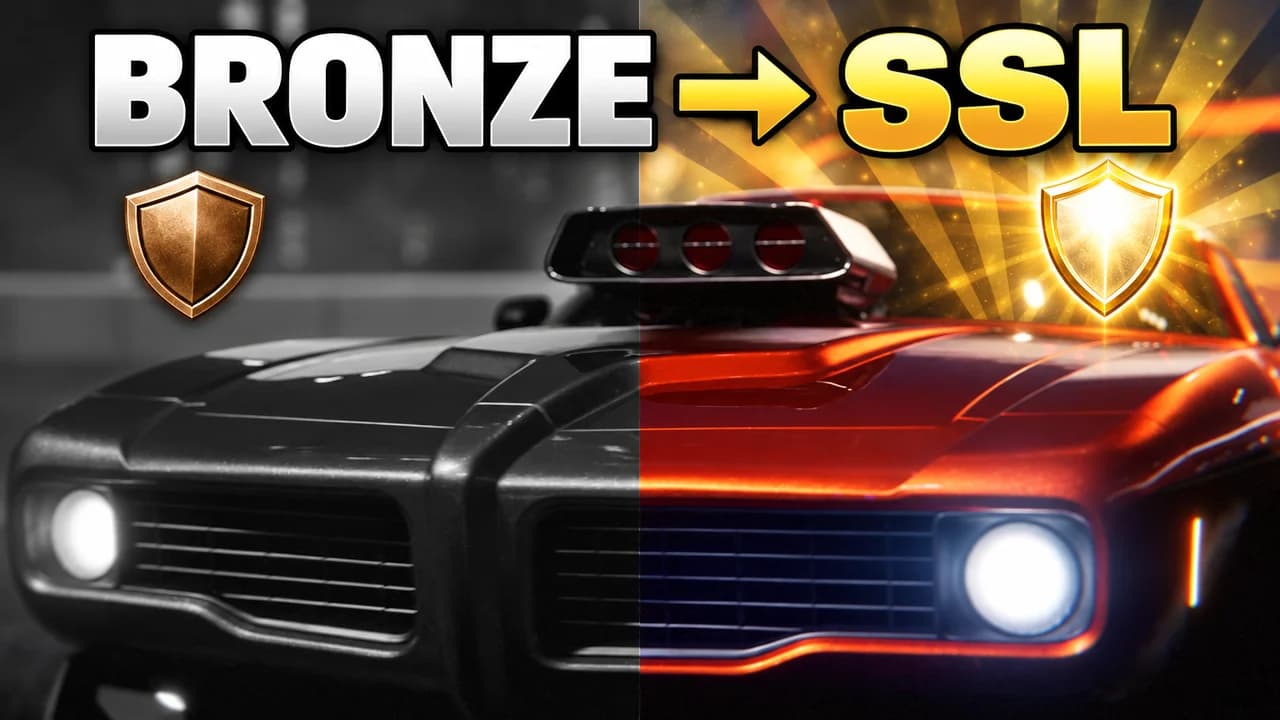
  • Rank climb: from Bronze to Supersonic Legend
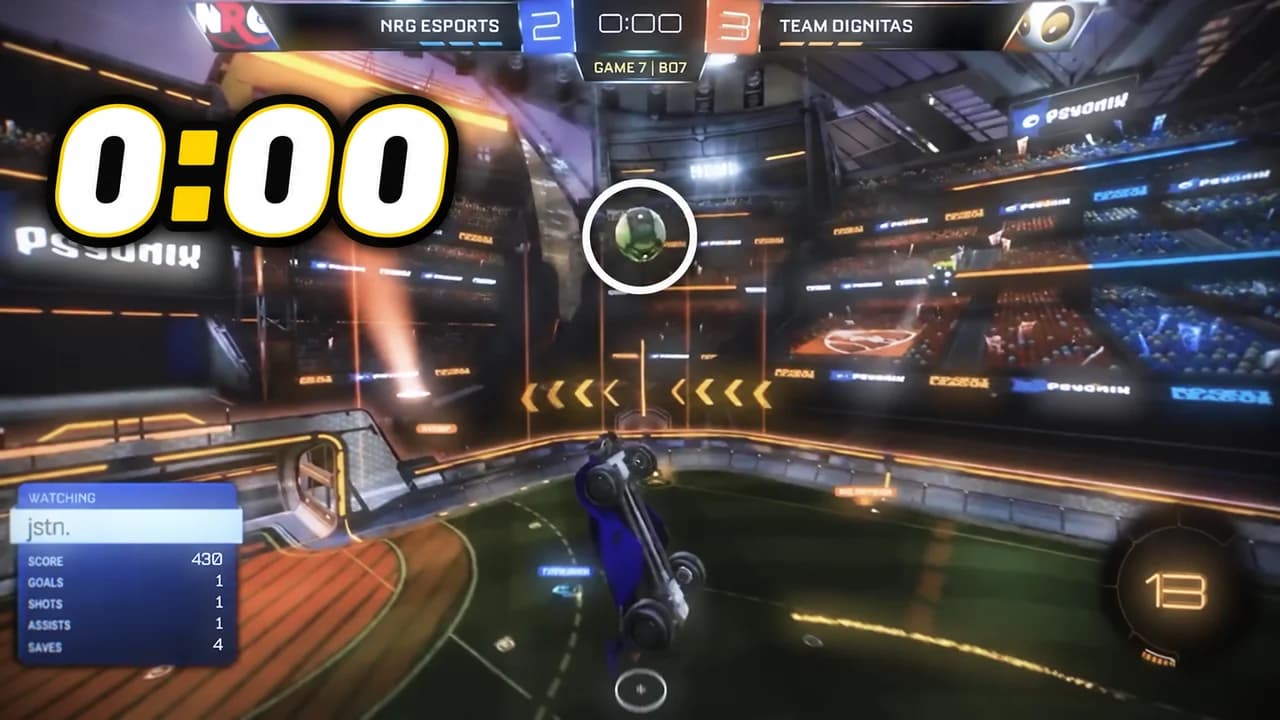
  • Clutch save: the last touch at zero seconds
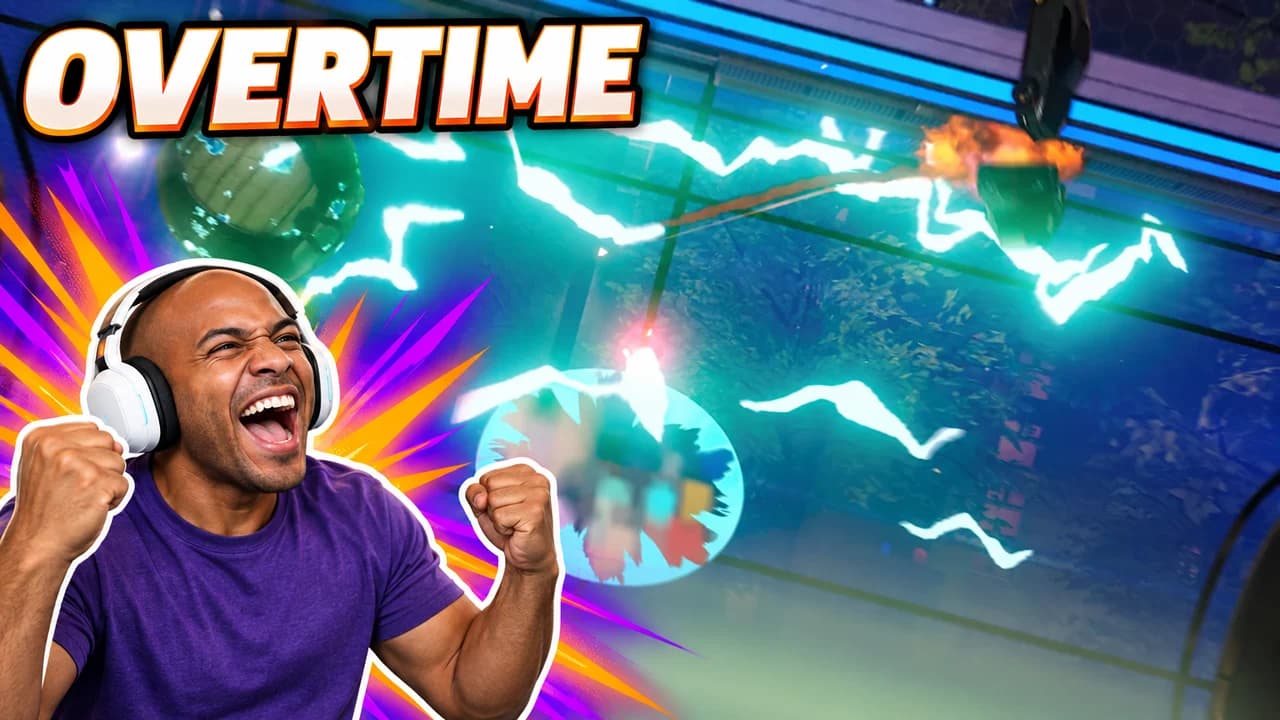
  • Face cam: the overtime goal
  • Versus: a 1v1, blue against orange
  • Freestyle: an air dribble across the whole field
Base.Tube Studio

Make a Rocket League-style thumbnail for your next video.

Describe your video in one line. Base.Tube makes three Rocket League thumbnails in your channel’s style, ready to download and test on YouTube.

  • Three ideas for each video
  • Your face and your channel’s style
  • Change anything in plain words
Generate a Rocket League-style thumbnail (opens in a new tab)
Style recipe

The Rocket League thumbnail style, rule by rule

Palette

  • Blue team #1E7BFFThe blue side, boost trails and calm backgrounds
  • Orange team #FF8A00The orange side, goal explosions and the main word
  • Boost yellow #FFD21ABoost pads, flames and the one detail that must grab the eye
  • Champion purple #8E4DFFRank badges and hype moments
  • Arena night #0C1330Dark backgrounds for montages and night arenas
  • Outline black #0B0B10Thick text outlines and drop shadows
Composition
One shot per image: a car in the air with the ball, a save on the line, a rank climb, a 1v1. The car and the ball are the heroes; make them big and show the trail of the boost so the movement reads. A piece of the interface (the scoreboard clock, the boost meter, the rank badge) says what is at stake. Keep the bottom-right corner clear.
Text
One to three words in heavy, italic, all-caps letters, white or yellow with a thick black outline: FLIP RESET, 0:00, BRONZE → SSL.
Faces & expressions
Cars have no faces, so the angle does the work: nose pointed at the ball, flipping upside down, flying straight at the viewer. A face cam of the creator adds the real emotion.
Background
A real arena, like DFH Stadium or Mannfield, in its team colours, blurred behind the car. A dark night arena with lights works for montages.
Props & details
  • The ball, glowing, with a speed trail
  • Boost trails and the boost meter
  • Goal explosions and the net
  • The scoreboard clock at 0:00 or in overtime
  • Rank badges from Bronze to Supersonic Legend
Layout recipes

Five layouts for Rocket League thumbnails

  1. Freestyle

    The highlight: a car upside down in the air, the ball glued to its nose, the goal behind. Made for freestyle, flip reset and "insane goal" videos.

    Prompt idea16:9 YouTube thumbnail for a Rocket League video: an Octane flipping in mid-air with the ball close to its nose, boost trail behind, the goal in the background, bright arena light, short text, keep the bottom-right corner clear, be creative with the composition

    Generate a Freestyle layout in the Base.Tube Studio (new tab)
  2. Rank Climb

    Before and after in one frame: Bronze and Supersonic Legend, a first match and a thousandth. Each side gets its own colour. Made for "Bronze to SSL" and "100 days" videos.

    Prompt idea16:9 YouTube thumbnail for a Rocket League video: split before/after, a dull Bronze rank badge on the left and a glowing Supersonic Legend badge on the right, the same car on both sides, short text, keep the bottom-right corner clear, be creative with the composition

    Generate a Rank Climb layout in the Base.Tube Studio (new tab)
  3. Clutch Save

    The last second: the ball rolling at the line, the clock at 0:00, a car diving to save it. The clock is the story.

    Prompt idea16:9 YouTube thumbnail for a Rocket League video: a car diving to save the ball on the goal line, the scoreboard clock at 0:00, crowd lights, blue against orange, short text, keep the bottom-right corner clear, be creative with the composition

    Generate a Clutch Save layout in the Base.Tube Studio (new tab)
  4. Face Cam

    The creator reacting next to the game: a ceiling shot, an own goal, a flip reset that worked. The face is large on one side, the play on the other. Our examples use an invented streamer.

    Prompt idea16:9 YouTube thumbnail for a Rocket League video: an invented streamer with a headset reacting in shock on one side, a Rocket League goal moment on the other, short text, keep the bottom-right corner clear, be creative with the composition

    Generate a Face Cam layout in the Base.Tube Studio (new tab)
  5. Versus

    Two cars nose to nose, blue against orange: a 1v1, two car bodies, two playstyles. The viewer picks a side before clicking.

    Prompt idea16:9 YouTube thumbnail for a Rocket League video: two cars nose to nose at centre field, blue against orange, the ball between them, a VS mark, short text, keep the bottom-right corner clear, be creative with the composition

    Generate a Versus layout in the Base.Tube Studio (new tab)

What makes a Rocket League thumbnail work

Rocket League clips are fast, and that is the problem. A goal that looks incredible in motion turns into a small car and a small ball on a big green field when it is frozen into a thumbnail. A good Rocket League thumbnail fixes that. It zooms in on one shot, shows the movement with a boost trail and uses the game's own contrast: blue against orange.

Many viewers see your thumbnail small, on a phone or in the sidebar. A wide replay shot does not survive that size. A car in the air with the ball at its nose does. Every rule on this page follows from that.

One car, one ball, one shot

The car and the ball are the heroes. Get close: the car should fill a third of the frame, the ball should be right next to it. Choose the angle that shows the trick: upside down for a flip reset, low and diving for a save, nose to nose for a 1v1. Fans know the car bodies, so an Octane, a Fennec, a Dominus or a Breakout reads at a glance.

Show the movement

A still image needs help to feel fast. A boost trail behind the car, a speed streak behind the ball, sparks where the wheels touch: one of these is enough to turn a frozen frame into a moment. For long plays like an air dribble, a dotted line tracing the path tells the whole story.

Blue against orange

The game already gives you the strongest colour contrast there is. Put the blue team on one side and the orange team on the other, or light your car blue against an orange goal. Use yellow for boost and the one detail that must grab the eye, and keep purple for rank badges.

Five layouts, one per video type

Most Rocket League videos fit one of five shapes: freestyle, rank climb, clutch save, face cam or versus. The layout recipes above give the structure of each one. Pick the layout that matches the promise of your video, then change the car, the arena and the words.

Text: short, italic, outlined

Three words is the limit. Use capitals, a heavy italic font and a thick black outline: FLIP RESET, 0:00, BRONZE → SSL. The words should add something the image cannot say on its own. To compare heavy display fonts, see the YouTube thumbnail fonts guide.

A Rocket League thumbnail background that stays behind

The Rocket League thumbnail background sets the mood and nothing else. A bright daytime arena suits goals and guides. A dark night arena with stadium lights suits a Rocket League montage thumbnail. Blur it so the car and the ball stand out. More ideas in the YouTube thumbnail backgrounds guide.

Faces and reactions

Cars have no faces, so a face cam adds the emotion: your scream at an overtime winner, your disbelief at an own goal. The examples on this page are generated with Base.Tube and use the game's own cars and arenas; their face cams show invented people.

Size and checks

Upload at 1280 × 720 pixels, in 16:9. For file size and format limits, see the YouTube thumbnail size guide. Keep the bottom-right corner empty, where YouTube shows the video length. Then put your thumbnail next to other Rocket League videos in the YouTube thumbnail preview and compare versions with the thumbnail tester. No tool can predict how many people will click before a video is live; when you connect your channel, Base.Tube shows the real impressions and click-through rate of each video.


Checklist

Do this, not that

Do

  • Show one car and the ball, big, with a boost trail that shows the movement.
  • Use the team colours with intent: blue against orange is the game's own contrast.
  • Show the stakes with the interface, like the clock at 0:00 or a rank badge.
  • Keep the text to three words or fewer, italic and outlined.
  • Leave the bottom-right corner clear for the video length.

Don't

  • Don't use a wide replay screenshot where the car is a few pixels.
  • Don't show a car body alone with no ball and no situation.
  • Don't fill the frame with stats, settings and controller binds; one idea per image.
  • Don't use thin fonts or small text; they disappear on a phone.
FAQ

Questions about Rocket League thumbnails

What makes a good Rocket League thumbnail?
One shot, shown big: a car in the air with the ball, a save at zero seconds, a rank-up. Use the blue and orange of the two teams as your contrast, add a boost trail so the movement reads, and keep the text to one to three words. Check it at phone size; if the car is a dot, zoom in.
How do I make a Rocket League montage thumbnail?
A montage thumbnail sells a mood. Use a dark night arena with stadium lights, one car in the air with a strong boost trail and a very short title such as your name. Keep most of the frame empty so it looks cinematic next to busier thumbnails.
What is a good Rocket League thumbnail background?
A real arena players know, like DFH Stadium or Mannfield, in its team colours and blurred behind the car. For montages, a dark night arena with lights works better. Avoid wide replay shots full of small details; they turn into noise at phone size.
What font do Rocket League thumbnails use?
Most use a heavy, italic, all-caps display font with a thick outline, which matches the game's sense of speed. Free fonts with a similar feel include Anton, Bebas Neue and Russo One, all on Google Fonts. Size and outline matter more than the exact font.
How do I make a Rocket League thumbnail?
Decide the shot your video promises, then show it close: the car, the ball and the trail between them. Add one piece of the interface if it proves the stakes, one to three words in a heavy outlined font, export at 1280 × 720 pixels and compare it in a feed preview.
Is there a free Rocket League thumbnail maker?
Any free image editor works if you follow the rules on this page. If you would rather describe your video and get options, the Base.Tube Studio makes Rocket League thumbnails in this style: pick one of the five layouts, say what happens, and keep the version you like.
Base.Tube Studio

Make a Rocket League-style thumbnail
for your next video.

Describe your video, pick a layout, and generate options in the Base.Tube Studio. Once the video is live, connect your channel to see its real impressions and click-through rate.