Geometry Dash thumbnail ideas
that pulse like the level.

A good Geometry Dash thumbnail shows one result in one look: the demon you finally beat, the death at 99%, the level that took a year to build. Below: 6 examples generated with Base.Tube using the game's real icons, game modes, difficulty faces and neon look, then the style rules, five layouts and a quick way to make your own.

See all 6 examples or open the Geometry Dash thumbnail maker

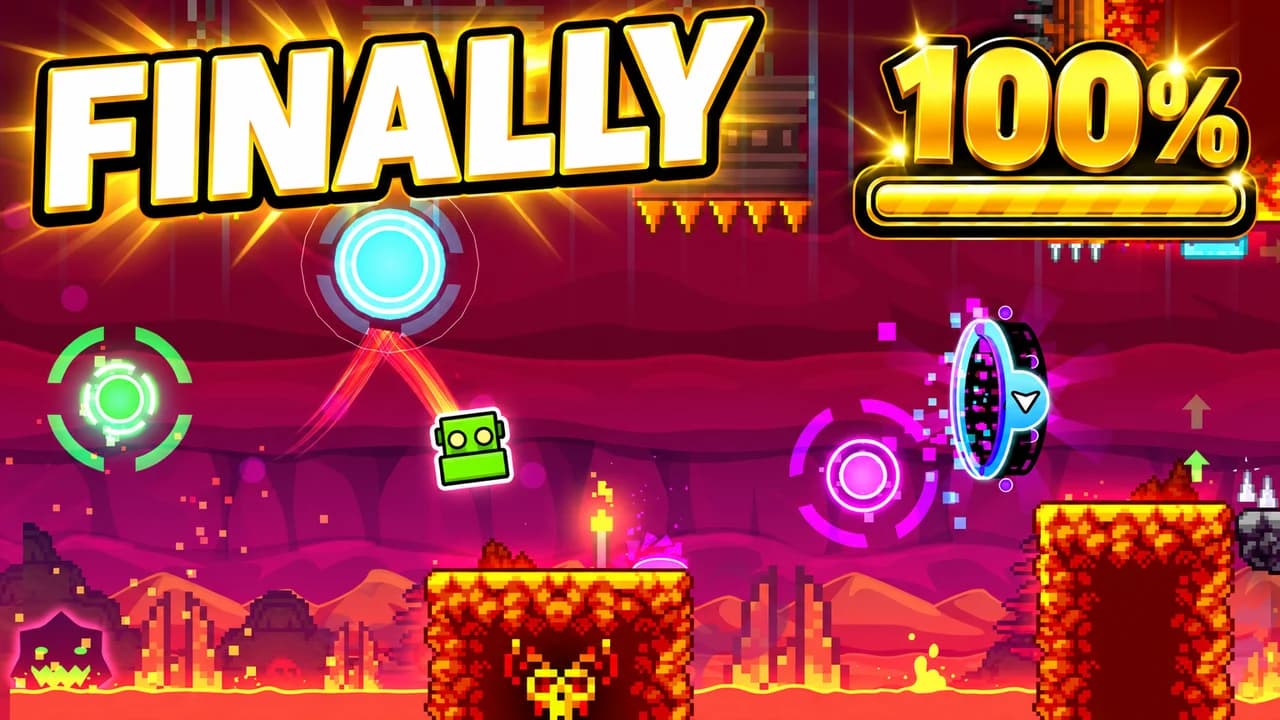
Geometry Dash thumbnail: a green cube jumping between glowing orbs over red lava blocks, a gold 100% badge with a full bar, text FINALLY
Demon: a lava level, finally beaten
Examples

6 Geometry Dash-style thumbnail examples

Every example is generated with Base.Tube in the game's own look, with its real characters and places. No real people, no copied thumbnails. Select one to see the prompt behind it.

  • Demon: a lava level, finally beaten
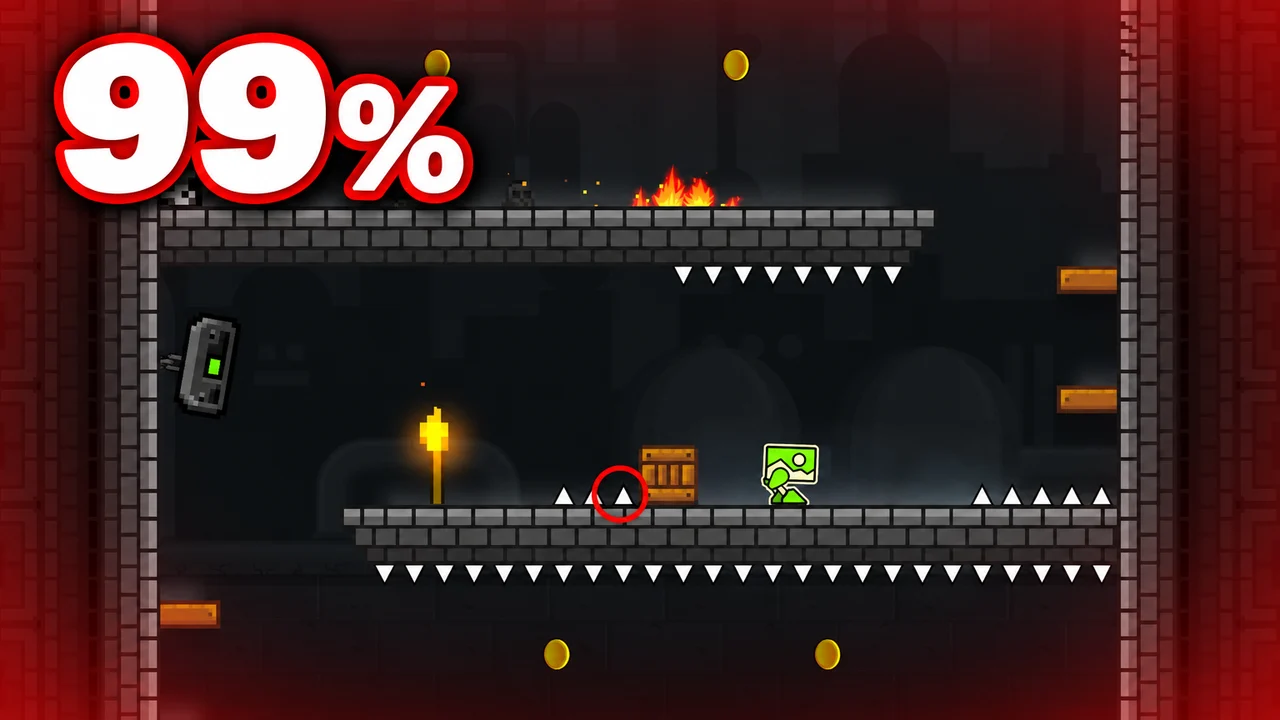
  • Fail: one small spike at 99%
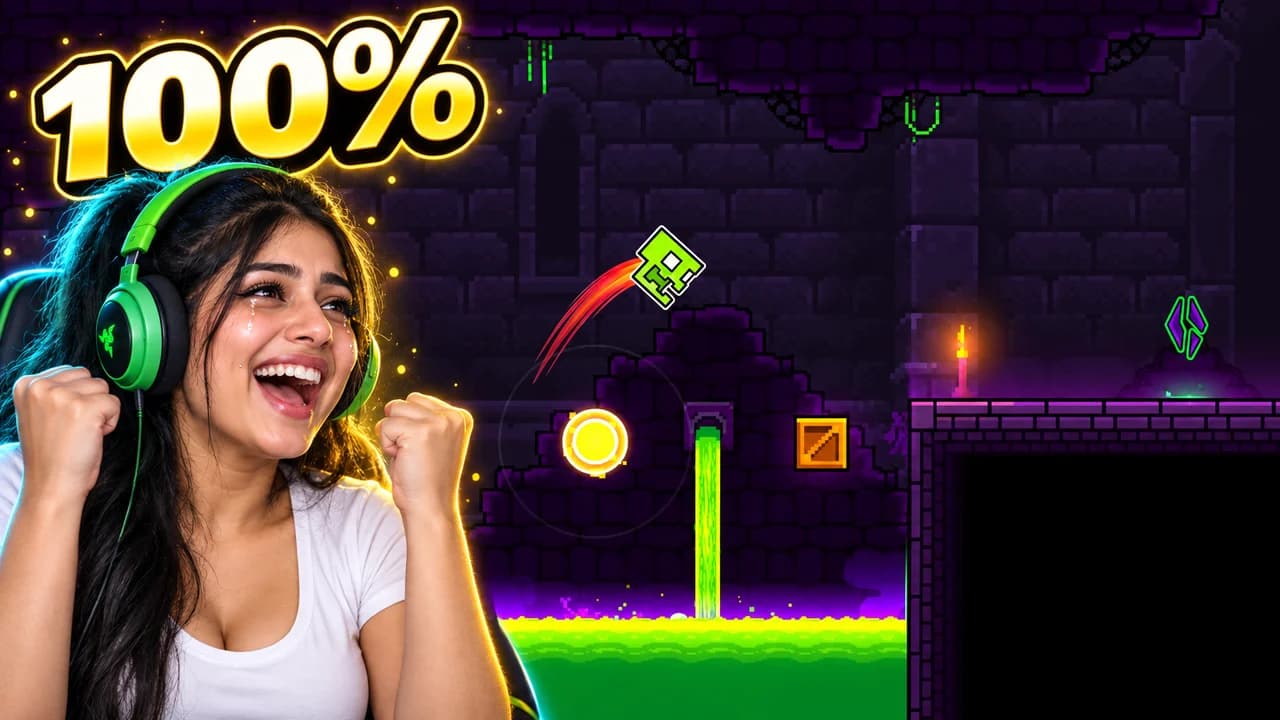
  • Face cam: the moment it hits 100%
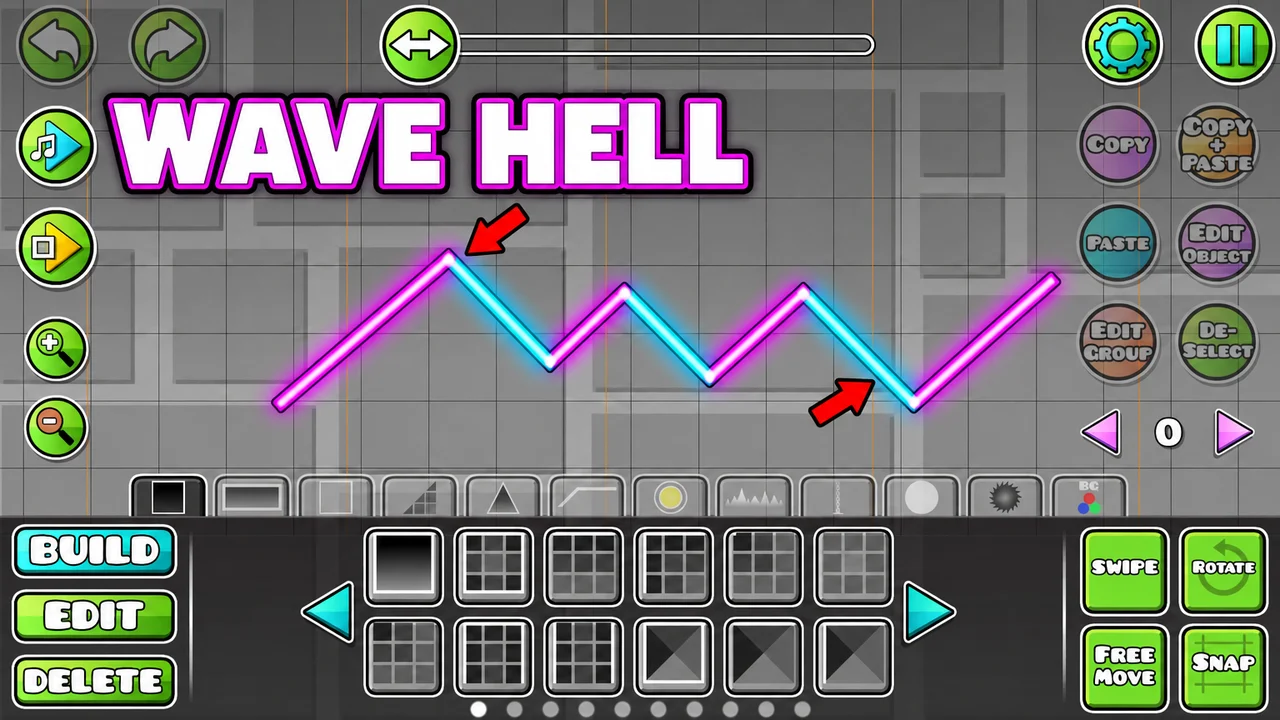
  • Level showcase: planning a wave section in the editor
  • Before and after: from an easy level to a demon
  • Demon: verifying a level nobody can beat
Base.Tube Studio

Make a Geometry Dash-style thumbnail for your next video.

Describe your video in one line. Base.Tube makes three Geometry Dash thumbnails in your channel’s style, ready to download and test on YouTube.

  • Three ideas for each video
  • Your face and your channel’s style
  • Change anything in plain words
Generate a Geometry Dash-style thumbnail (opens in a new tab)
Style recipe

The Geometry Dash thumbnail style, rule by rule

Palette

  • Icon green #7DFF00The default icon colour, progress bars and wins
  • Neon cyan #00E5FFGlowing outlines, portals and the main word
  • Demon red #FF1E3CDemon faces, deaths at 99% and arrows
  • Portal magenta #FF2BD6Ship and wave sections, hype accents
  • Level night blue #0A1A5CBackgrounds behind the icon and the blocks
  • Outline black #000000Block outlines, text outlines and drop shadows
Composition
One result per image: a demon beaten, a death at 99%, a new level, a first versus a hardest. The icon is tiny in the game, so make it big in the thumbnail, or show a wide neon section with the icon in it. A piece of the interface (the progress bar, the percentage, the demon difficulty face, the practice checkpoints) says what happened. Keep the bottom-right corner clear for the video length.
Text
One to three words or a percentage, in heavy rounded capitals with a thick black outline, close to the game's own bubbly font: 99%, VERIFIED, FINALLY.
Faces & expressions
The cube icon has one face, so the difficulty faces and the creator's face do the emotional work: the angry red demon face, a face cam screaming at 99% or crying with joy at 100%.
Background
The level itself in neon: dark blue or black with glowing blocks, a colour that pulses with the music. Blur or darken it behind the icon so the main object stands out.
Props & details
  • The progress bar and a big percentage
  • Difficulty faces, from Easy to Extreme Demon
  • The cube, ship, ball, UFO, wave and robot game modes
  • Portals, orbs, pads and spikes
  • Practice-mode checkpoints
Layout recipes

Five layouts for Geometry Dash thumbnails

  1. Demon

    The big completion: the icon in front of the level, the Extreme Demon face or the 100% screen. Made for "I beat my first demon" and hardest level videos.

    Prompt idea16:9 YouTube thumbnail for a Geometry Dash video: a glowing cube icon in front of a dark neon level, a huge red Extreme Demon difficulty face behind it, a full progress bar, short text, keep the bottom-right corner clear, be creative with the composition

    Generate a Demon layout in the Base.Tube Studio (new tab)
  2. Fail

    The death everyone has felt: the icon exploding a few pixels from the end, the progress bar stuck at 99%. The percentage is the text.

    Prompt idea16:9 YouTube thumbnail for a Geometry Dash video: a cube icon exploding on the last spike, progress bar frozen at 99%, red flash, the number "99%" huge, keep the bottom-right corner clear, be creative with the composition

    Generate a Fail layout in the Base.Tube Studio (new tab)
  3. Level Showcase

    A wide shot of the level's best section: a wave corridor, a ship tunnel, a boss-like decoration, glowing in neon. Made for creator showcases, verifications and new levels.

    Prompt idea16:9 YouTube thumbnail for a Geometry Dash video: a wide shot of a glowing neon level section, a wave icon zig-zagging through a tight corridor of spikes, pulsing colours, short text, keep the bottom-right corner clear, be creative with the composition

    Generate a Level Showcase layout in the Base.Tube Studio (new tab)
  4. Face Cam

    The creator reacting next to the game: screaming at 99%, crying with joy at 100%. The face is large on one side, the level on the other. Our examples use an invented streamer.

    Prompt idea16:9 YouTube thumbnail for a Geometry Dash video: an invented streamer with a headset screaming on one side, a Geometry Dash level and its progress bar on the other, short text, keep the bottom-right corner clear, be creative with the composition

    Generate a Face Cam layout in the Base.Tube Studio (new tab)
  5. Before and After

    Two levels or two skill levels in one frame: the first easy level against the hardest demon, a beginner against a pro, an old version of a level against its remake. Each side gets its own colour.

    Prompt idea16:9 YouTube thumbnail for a Geometry Dash video: split before/after, a simple bright easy level on the left and a dark, spike-filled demon level on the right, the same cube on both sides, short text, keep the bottom-right corner clear, be creative with the composition

    Generate a Before and After layout in the Base.Tube Studio (new tab)

What makes a Geometry Dash thumbnail work

Geometry Dash is a game of tiny icons, tight timing and loud colours. That makes it tricky on YouTube. A screenshot of a hard level looks amazing full-screen, but at phone size the icon becomes a dot and the spikes become noise. A good Geometry Dash thumbnail fixes that: it zooms in on one result and lets the neon do the rest.

Fans read the game fast. They know the difficulty faces, the game modes and the meaning of a frozen progress bar. Use those signs, large and clean, and they will understand your video in a second.

The result is the story

Every Geometry Dash video promises one result. Pick it and put it first:

  • A demon beaten: the icon in front of the level, the Extreme Demon face behind it, the progress bar full.
  • A fail at 99%: the icon shattering on the last spike, the number huge.
  • A level showcase: a wide shot of the best-looking section, the icon inside it.
  • A reaction: your face next to the moment the bar hits 100%.
  • A before and after: an easy level next to a demon, a beginner next to a pro.

Make the small things big

In the game, the icon is a small square and the difficulty face sits in a menu. In the thumbnail, they should be the heroes. Zoom in on the icon until its face is clear, or show the difficulty face as a big badge. A huge red demon face tells the viewer "this is hard" before they read the title.

Neon with intent

The game is full of colour, so a Geometry Dash thumbnail has to choose. Keep the background dark and pick one neon accent: green for a win, red for a demon or a death, cyan or magenta for hype and showcases. One bright colour on a dark frame pops in the feed; six bright colours turn into mud.

Text: a number or a word

Three words is the limit, and often one number is enough: 99%, 100%. Use a heavy, rounded font with a thick black outline, close to the game's own bubbly letters. Keep attempt counts and level IDs in the title, not the image. To compare heavy display fonts, see the YouTube thumbnail fonts guide.

A Geometry Dash thumbnail background that stays behind

The Geometry Dash thumbnail background is usually the level itself, darkened and blurred behind the icon. For a showcase, the level can be the subject, but one shape should still lead the eye: a portal, a dragon decoration, a wave corridor. More ideas in the YouTube thumbnail backgrounds guide.

Faces and reactions

The cube has one face, so a face cam adds the emotion: the scream at 99%, the tears at 100%. Put your face large on one side and the level on the other. The examples on this page are generated with Base.Tube and use the game's own icons, levels and difficulty faces; their face cams show invented people.

Size and checks

Upload at 1280 × 720 pixels, in 16:9. For file size and format limits, see the YouTube thumbnail size guide. Keep the bottom-right corner empty, where YouTube shows the video length. Then put your thumbnail next to other Geometry Dash videos in the YouTube thumbnail preview and compare versions with the thumbnail tester. No tool can predict how many people will click before a video is live; when you connect your channel, Base.Tube shows the real impressions and click-through rate of each video.


Checklist

Do this, not that

Do

  • Make the icon or the difficulty face big; in the game they are tiny.
  • Use the percentage as the text when it is the story (99%, 100%).
  • Pick one neon accent: green for a win, red for a demon or a death, cyan or magenta for hype.
  • Keep the text to three words or fewer, in a round, heavy, outlined font.
  • Leave the bottom-right corner clear for the video length.

Don't

  • Don't use a raw gameplay screenshot; the icon becomes a dot at phone size.
  • Don't stack every portal, orb and colour in one frame; the eye has nowhere to land.
  • Don't put attempt counts, level IDs and stats in the image; they belong in the title.
  • Don't use thin fonts or small text; they disappear on a phone.
FAQ

Questions about Geometry Dash thumbnails

What makes a good Geometry Dash thumbnail?
One result, readable in a second: a demon beaten, a death at 99%, a new level. Make the icon or the difficulty face large, keep the level behind it dark and glowing, and add one to three words or a percentage. Check it at phone size; if the icon disappears, zoom in.
What is a good Geometry Dash thumbnail background?
The level itself, darkened: deep blue or black with glowing blocks and one neon colour. Blur it behind the icon so the main object stands out. For level showcases, a wide shot of the best-looking section works on its own, as long as one shape leads the eye.
What font do Geometry Dash thumbnails use?
Many use a heavy, bubbly, rounded font with a thick black outline, close to the game's own title font. Free fonts with that feel include Lilita One, Luckiest Guy and Fredoka, all on Google Fonts. Size and outline matter more than the exact font.
How do I make a Geometry Dash level thumbnail?
Pick the best-looking section of the level, the one with the strongest shapes and colours, and show it wide with the icon inside. Add the difficulty face as a small badge and one to three words. Export at 1280 × 720 pixels and compare it with other level videos in a feed preview.
How do I show a 99% fail in a thumbnail?
Freeze the moment of death: the icon shattering on the last spike, the end of the level in sight, the progress bar stuck at 99%. Make the number huge and red. The viewer reads "so close" before anything else, and that is the whole video.
Is there a free Geometry Dash thumbnail maker?
Any free image editor works if you follow the rules on this page. If you would rather describe your video and get options, the Base.Tube Studio makes Geometry Dash thumbnails in this style: pick one of the five layouts, say what happens, and keep the version you like.
Base.Tube Studio

Make a Geometry Dash-style thumbnail
for your next video.

Describe your video, pick a layout, and generate options in the Base.Tube Studio. Once the video is live, connect your channel to see its real impressions and click-through rate.