

YouTube thumbnail reaction images
your face, their content, one emotion.

YouTube thumbnail reaction images are cut-out faces placed over the thing being reacted to: a clip, a product, a game, a chart. The face tells the viewer how to feel; the background tells them what about. Below: 6 original examples with synthetic people, five layouts, and how to make a set of reaction faces of your own.

See all 6 examples

Reaction thumbnail: a cut-out woman with hands on her head in front of a giant wave hitting a pier, red arrow, text NO WAY
Face and screen: the clip behind, the face in front
Examples

6 Reaction-style thumbnail examples

Every example is an original image generated with Base.Tube: no real people, logos or copied thumbnails. Select one to see the prompt behind it.

  • Face and screen: the clip behind, the face in front
  • Two reactions: one laughs, one cringes
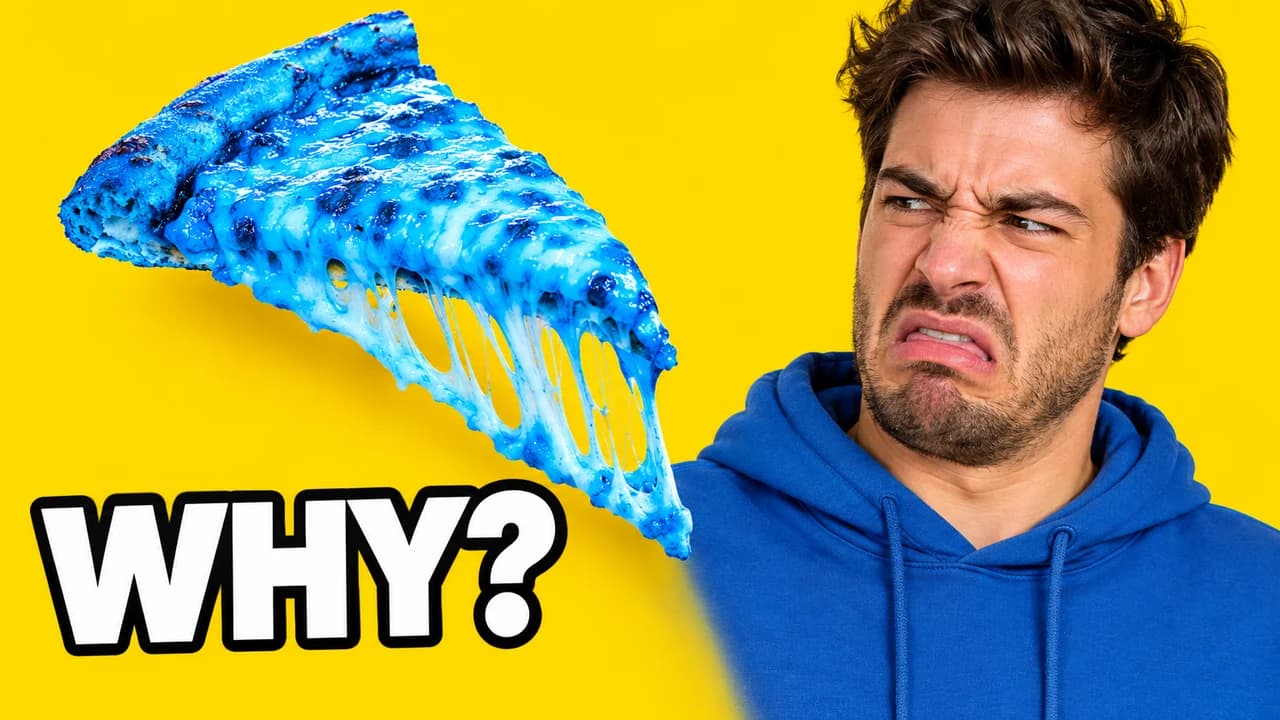
  • Product reaction: the blue pizza
  • Phone reaction: the screen light on the face
  • Reaction grid: four faces, one painting
  • Face and screen: the game in his eyes
Base.Tube Studio

Make a Reaction-style thumbnail for your next video.

Describe your video in one line. Base.Tube makes three Reaction thumbnails in your channel’s style, ready to download and test on YouTube.

  • Three ideas for each video
  • Your face and your channel’s style
  • Change anything in plain words
Generate a reaction thumbnail (opens in a new tab)
Style recipe

The Reaction thumbnail style, rule by rule

Palette

  • Cut-out white #FFFFFFThe thin stroke around the cut-out face
  • Arrow red #FF2A2AArrows and circles linking face and content
  • Glow yellow #FFD21FBack-glow behind the face and short captions
  • Screen blue #2F6BFFScreen light on the face, tech and gaming content
  • Shadow black #101010Drop shadow under the cut-out and text outline
Composition
The cut-out face large on one side, usually the left or right third, overlapping the content behind it. The content fills the rest of the frame. An arrow or the person's eyes connect the two.
Text
Optional. Zero to three words, or an emoji-like symbol (?!, ??). The face is the caption.
Faces & expressions
One clear emotion per image: shock, disgust, laughter, confusion, disbelief, cringe. Exaggerated but believable. Eyes pointing at the content.
Background
The content itself: a frame of the clip, the product, the game, the post. Blur or darken it slightly so the face stays the hero.
Props & details
  • A thin white stroke and soft drop shadow around the cut-out
  • A red arrow or circle on the key moment
  • A screen frame, phone frame or video player border around the content
Layout recipes

Five layouts for Reaction thumbnails

  1. Face and screen

    The classic. A cut-out face in the corner, a frame of the video being watched behind it. Use it for reaction videos to clips, trailers and music.

    Prompt idea16:9 YouTube thumbnail, cut-out of an original shocked person with a thin white outline on the left, a dramatic blurred video frame behind them, red arrow, original characters, no real people

    Generate a Face and screen layout in the Base.Tube Studio (new tab)
  2. Two reactions

    Two faces with opposite emotions. Use it for duo reactions, before-and-after and "we disagreed" videos.

    Prompt idea16:9 YouTube thumbnail, two original people cut out side by side, one laughing and one disgusted, content between them, original characters, no real people

    Generate a Two reactions layout in the Base.Tube Studio (new tab)
  3. Product reaction

    A face reacting to an object held up or floating beside it. Use it for taste tests, unboxings and reviews.

    Prompt idea16:9 YouTube thumbnail, original person with a disgusted face on the right, a strange coloured drink floating on the left, clean studio background, original characters, no real people

    Generate a Product reaction layout in the Base.Tube Studio (new tab)
  4. Phone reaction

    A face lit by a phone screen, the post or chat visible in the phone. Use it for reading comments, DMs and social media reactions.

    Prompt idea16:9 YouTube thumbnail, original person lit by a phone screen with a shocked face, an oversized phone with a blurred chat on the other side, original characters, no real people

    Generate a Phone reaction layout in the Base.Tube Studio (new tab)
  5. Reaction grid

    Four small faces with four emotions around one image. Use it for group reactions and compilation videos.

    Prompt idea16:9 YouTube thumbnail, one central image surrounded by four small cut-out faces of original people, each with a different emotion, bright colours, original characters, no real people

    Generate a Reaction grid layout in the Base.Tube Studio (new tab)

What reaction images do in a thumbnail

A reaction video thumbnail sells two things at once: the content and the person watching it. YouTube thumbnail reaction images do the same in one frame. A cut-out face, showing one strong emotion, sits on top of the thing being reacted to. The viewer sees the clip, the product or the game, and instantly knows how the creator felt about it.

When people search for thumbnail reaction images, they usually want a ready face to drop into their own thumbnail. The best reaction face for a thumbnail is your own, because it builds recognition every time a viewer sees it. This page shows how to make a set.

Build your own reaction set

Reaction channels keep a library of their own faces and reuse it. Making one takes an hour:

  • Light: face a window or a soft light, so the face is evenly lit.
  • Background: a plain wall makes cut-outs easy.
  • Emotions: shock, laughter, disgust, confusion, disbelief, cringe, excitement, fear. Ten to fifteen in total.
  • Several shots each: keep the one where the eyes and mouth agree.
  • Cut out once: save each face as a transparent PNG with a thin white edge and a soft shadow.

If you run a faceless channel, generate one consistent synthetic character and give it the same set of emotions. The Base.Tube Studio can generate an original character in each expression.

Five layouts that cover most videos

  • Face and screen for reactions to clips, trailers and music.
  • Two reactions for duos with opposite opinions.
  • Product reaction for taste tests, unboxings and reviews.
  • Phone reaction for reading comments, DMs and posts.
  • Reaction grid for group reactions and compilations.

Whatever the layout, keep one thing true: the eyes or an arrow point at the content. A face looking into empty space breaks the link.

Making it readable

The face should take up a third of the frame or more. At phone size, small faces turn into dots and the emotion disappears. Blur or darken the content slightly so the face stays the hero, and keep any text to three words. For the history of the exaggerated expression itself, see our page on the YouTube thumbnail face; for a speech-bubble twist, see zamn thumbnails.

Respect the content you react to

A reaction video uses someone else's work as material. Your face and commentary should be the main subject of the thumbnail, not a full frame of the original. Never copy the original video's thumbnail, and never use another creator's face as a reaction image.

Test before you upload

Check that the emotion reads at feed size in the YouTube thumbnail preview, and compare two faces for the same video with the thumbnail tester. Export at 1280 × 720; the YouTube thumbnail size guide has the limits.


Checklist

Do this, not that

Do

  • Shoot or generate your own set of reaction faces, one per emotion.
  • Make the face big and the emotion obvious at phone size.
  • Point the eyes or an arrow at the content.
  • Cut the face out cleanly with a thin white edge and soft shadow.
  • Leave the bottom-right corner clear for the video length.

Don't

  • Don't download another creator's face or a streamer's reaction image.
  • Don't use a frame from someone else's video as the whole thumbnail.
  • Don't show a fake emotion the video never has.
  • Don't stack more than four faces; they shrink to dots.
FAQ

Questions about Reaction thumbnails

What are YouTube thumbnail reaction images?
They are cut-out photos of a face showing one emotion, placed on a thumbnail next to the thing being reacted to. Reaction channels keep a library of their own faces, shocked, laughing, disgusted, confused, and reuse them across videos. The face tells the viewer the mood of the video before they read the title.
Where can I get reaction images for my thumbnails?
The best source is you. Shoot ten to fifteen photos of your own face in good light, one per emotion, against a plain wall, and cut them out once. If you do not show your face, generate a consistent synthetic character instead. Avoid downloading other people's reaction images: those are someone else's face and someone else's photo.
How do I make a reaction face look natural?
Think of something that really causes the emotion while you shoot, and exaggerate it slightly. Light the face evenly from the front so the expression reads at small size. Take several shots per emotion and keep the one where the eyes match the mouth.
Can I use a frame from the video I am reacting to?
A small, transformed part of it, as context for your own commentary, is common practice, but it is not automatically allowed. Your face and your reaction should be the main subject. Never copy someone else's thumbnail. If in doubt, blur or crop the frame and let your reaction carry the image.
Do reaction thumbnails work for faceless channels?
Yes, with a recurring synthetic character or a mascot. The point is one clear emotion next to the content. A consistent character that reacts the same way every time also builds recognition.
Base.Tube Studio

Make a Reaction-style thumbnail
for your next video.

Describe your video, pick a layout, and generate options in the Base.Tube Studio. Once the video is live, connect your channel to see its real impressions and click-through rate.