
This caught my attention because the last few years have split DAWs into two camps: tools that genuinely speed up a creator’s output, and tools that mostly sell shiny plugin bundles. As someone who edits livestreams, scores short films, and produces quick turnaround tracks, I wanted a no-nonsense run-down of which DAWs actually help creators ship better audio – fast.
The Best Digital Audio Workstations for Content Creators in 2025 – practical picks, not hype
- Key takeaway: Choose a DAW for workflow, not fanboy status – Session view (Ableton) vs. linear composition (Logic/Cubase) matters.
- Key takeaway: Watch platform lock-in and pricing: Logic’s one‑time buy vs. Pro Tools’ subscription vs. expensive “all plugins” bundles.
- Key takeaway: If you stream live or need fast turnaround, prioritize DAWs with good loop/pattern tools and low-latency monitoring (Ableton, FL, Bitwig).
- Key takeaway: For film/game audio and immersive formats, Pro Tools and Cubase still lead for industry standards like Dolby Atmos and advanced MIDI/orchestration.
{{INFO_TABLE_START}}
Publisher|Base.tube
Release Date|2025-12-03
Category|Music and creative tools for creators
Platform|Multiple (Windows, macOS, Linux — varies by DAW)
{{INFO_TABLE_END}}
What Creators Actually Need from a DAW
Before diving into specific picks, let’s cut through the marketing noise. Most DAW comparison articles are written for producers making albums. Creators have different priorities. You need fast export — bouncing a 30-second intro sting shouldn’t take five clicks through nested menus. You need low-latency monitoring so your voice or instrument doesn’t lag behind your stream. You need decent loop and sample libraries out of the box, because hunting for royalty-free sounds at 2 AM before a deadline is not a workflow — it’s a cry for help.
Two features that most guides ignore: video sync and stem export for social. If you score your own YouTube videos, you need a DAW that lets you import a video reference and lock your audio to specific timestamps. Logic, Cubase, and Pro Tools handle this well. FL Studio and Ableton can do it, but it’s clunkier. And stem export — splitting your track into vocals, drums, melody, and effects — is becoming essential for repurposing content across TikTok, Reels, and Shorts where you might want just the beat or just the vocal hook. Studio One and Ableton handle stem workflows more gracefully than most.
Bottom line: if a DAW slows you down between idea and published content, it doesn’t matter how many Grammy winners use it. Pick for speed and output, not prestige.
The short version: who shines and why
Ableton Live
Ableton Live — still the live/loop king. If you stream live sets, make beats on the fly, or build tracks during a stream, Ableton’s Session View remains peerless. Its clip-based workflow reduces context switching, which matters when you’re juggling chat, scenes, and audio. The dual-view system — Session for jamming, Arrangement for finishing — means you can improvise during a livestream and then polish the recording into a finished track without switching tools. Ableton’s built-in effects are genuinely usable, particularly the Glue Compressor and Corpus for quick sound design. The biggest limitation is price: the full Suite edition runs $749, and the entry-level Intro ($99) strips out too many features for serious work. Standard at $449 is the sweet spot for most creators. Workflow tip: set up a default template with your streaming audio inputs pre-routed — it’ll save you ten minutes every session.
Logic Pro
Logic Pro — best value for Mac users. One-off price, huge sound library, and composition tools that make scoring quick. But it’s Apple‑only; buying into Logic is effectively buying into macOS for audio work. At $199.99 as a one-time purchase, Logic is absurdly good value. You get a 72 GB sound library, Drummer tracks that generate realistic drum parts on the fly, and a surprisingly capable AI-assisted mastering tool in the Mastering Assistant. For YouTube creators who score their own content, the video import and scoring workflow is smooth — better than most competitors at this price point. The limitation: no Windows or Linux version, ever. If there’s any chance you’ll switch platforms in the next five years, factor that into your decision. Workflow tip: use Smart Tempo to match imported audio clips to your project BPM automatically — a massive time-saver when working with samples from different sources.
Cubase
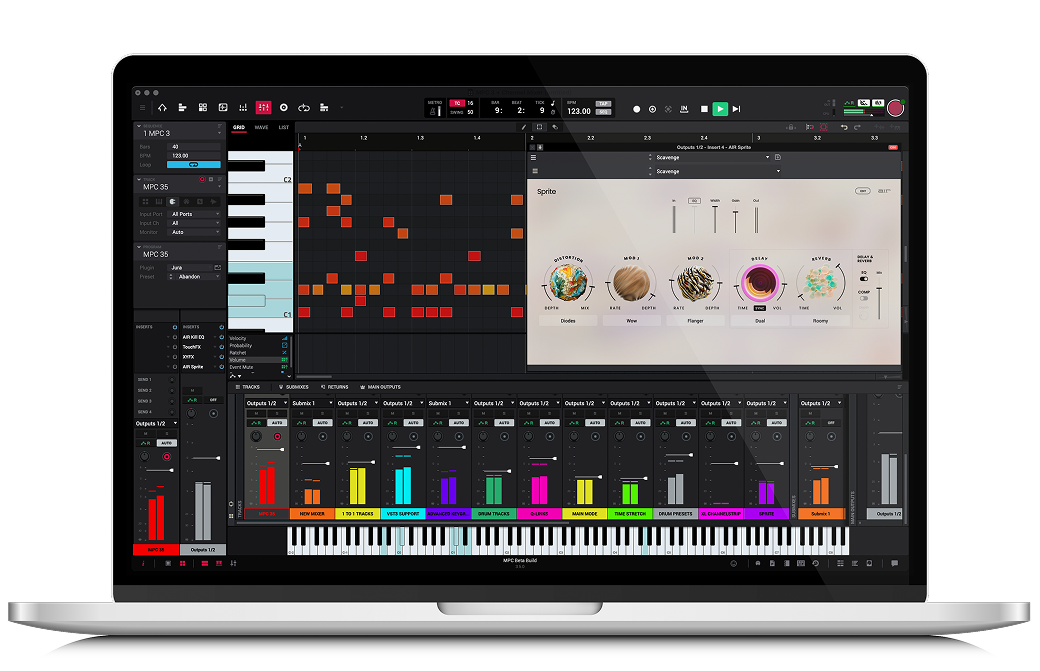
Cubase — MIDI nerds and orchestrators: Cubase still offers the deepest MIDI editing and expression tools. If you’re writing complex arrangements or scoring, its toolset saves hours compared with more performance-oriented DAWs. The Key Editor and Score Editor are leagues ahead of anything else for detailed MIDI work, and the Expression Maps system lets you control orchestral libraries with precision that other DAWs can only approximate with workarounds. Cubase Pro ($579) is the full package; Elements ($99) is surprisingly capable for creators who mainly need recording and basic MIDI. The learning curve is real — Cubase’s interface can feel dense until you customize it. But once you build your workflow, it’s one of the fastest DAWs for complex production. Ideal for creators who produce cinematic content, game audio, or orchestral YouTube covers. Workflow tip: create macro commands for your most common editing sequences — Cubase’s macro system is one of the most powerful and underused features in any DAW.
Pro Tools
Pro Tools — studio standard for a reason. If you’re collaborating with professional studios, delivering broadcast-ready mixes, or mixing for immersive formats (Dolby Atmos/Spatial Audio), Pro Tools is often required. The tradeoff: subscription models and a steeper learning curve for solo creators. Pro Tools now runs $9.99/month for the Artist tier (formerly “First” — limited to 32 audio tracks) or $39.99/month for the full Studio version with Dolby Atmos support. The subscription model is polarizing, but it does mean lower upfront cost if you’re testing the waters. Pro Tools’ editing precision is still unmatched for dialogue, podcast post-production, and film scoring. If you’re delivering audio to clients who work in studios, sending them a Pro Tools session file eliminates compatibility headaches. Biggest limitation for creators: it’s not built for beat-making or live performance. Workflow tip: learn the keyboard shortcuts for Clip Gain and Fades — these two features alone make podcast editing twice as fast.
FL Studio
FL Studio — the fastest beat-to-track pipeline. Pattern-based sequencing and rapid sound design keep it a favorite for beatmakers and creators who need to pump out tracks quickly. It’s also beginner-friendly but scales surprisingly well. The lifetime free updates policy is unique and genuinely consumer-friendly — buy once, get every future version. Fruity Edition starts at $99, Producer at $199, and the All Plugins Bundle at $499. For most creators, Producer is enough. FL’s Channel Rack and Piano Roll are among the most intuitive in any DAW for writing melodies and programming drums. The limitation: audio recording and mixing workflows feel bolted-on compared to the beat-making side. It’s gotten much better in recent versions, but if your primary need is recording vocals or live instruments, other DAWs handle it more naturally. Ideal for YouTube beat-makers, lo-fi producers, and creators who release music as content. Workflow tip: use the Pattern system to build modular song sections — you can rearrange entire songs by dragging patterns in the Playlist, which is faster than copying and pasting regions.
Studio One
Studio One — an efficient all-rounder. Modern UI and solid integration with PreSonus hardware. The Professional edition’s Melodyne integration is a real time-saver for vocal work without buying extra plugins. Studio One Professional runs $399 one-time, and the built-in Melodyne (ARA integration) means pitch correction without leaving the DAW. The drag-and-drop workflow is genuinely faster than most competitors for arranging and sound design. It also has a dedicated mastering suite built in — no need for a separate mastering session. Artist edition at $99 covers basics but lacks third-party plugin support, which is a dealbreaker for many. Ideal for creators who need a balanced tool for recording, mixing, and mastering without juggling multiple apps. Workflow tip: use the Scratch Pad feature to test arrangement ideas without destroying your main timeline — it’s like having a sandbox inside your project.
Bitwig Studio
Bitwig — best for experimental electronic creators and Linux users. Its modular device system and live performance features blur the line between DAW and instrument, which is exciting for creators who want fresh sounds fast. Bitwig runs $399 for the full version or $16.99/month, and it’s one of the only professional DAWs with native Linux support. The Grid — Bitwig’s modular synthesis environment — lets you build custom instruments and effects from scratch, which is catnip for sound designers. The multi-track clip launcher rivals Ableton’s Session View and arguably handles audio clips better. Limitation: smaller community and fewer tutorials than the big names, so you’ll be doing more self-guided learning. Plugin compatibility is excellent though — it handles VST3 and CLAP natively. Ideal for experimental musicians, electronic artists, and Linux-based creators who want something that feels genuinely modern. Workflow tip: use the Operators (note/audio) to create generative sequences — great for ambient backgrounds and evolving textures in video content.
DAW Comparison Table
| DAW | Price | Platform | Best For | Learning Curve | Live Streaming |
|---|---|---|---|---|---|
| Ableton Live | $99–$749 | Windows, macOS | Live performance, looping, beat-making | Moderate | Excellent |
| Logic Pro | $199.99 (one-time) | macOS only | Composing, scoring, all-round production | Moderate | Good |
| Cubase | $99–$579 | Windows, macOS | MIDI, orchestration, film scoring | Steep | Limited |
| Pro Tools | $9.99–$39.99/mo | Windows, macOS | Mixing, broadcast, podcast post-production | Steep | Limited |
| FL Studio | $99–$499 (lifetime updates) | Windows, macOS | Beat-making, fast production | Easy–Moderate | Good |
| Studio One | $99–$399 | Windows, macOS | Recording, mixing, mastering | Easy–Moderate | Fair |
| Bitwig Studio | $399 or $16.99/mo | Windows, macOS, Linux | Experimental, electronic, sound design | Moderate–Steep | Excellent |
Free DAWs Worth Considering
Not every creator needs to spend money on a DAW right away. If you’re starting out, testing a new workflow, or just need basic audio editing, there are legitimate free options that won’t embarrass you.
GarageBand (macOS/iOS)
If you own a Mac, you already have a surprisingly capable DAW. GarageBand shares Logic Pro’s core engine and includes Drummer tracks, a decent loop library, and enough instruments to produce complete tracks. It’s the best on-ramp to Logic — projects transfer seamlessly when you’re ready to upgrade. Limitation: no third-party plugin support and limited mixing tools. But for podcast intros, YouTube background music, and learning production basics, it’s hard to beat free.
Audacity
Audacity is not a DAW in the traditional sense — it’s a destructive audio editor. But for podcasters, voiceover artists, and creators who need to clean up recorded audio, it does the job. Noise removal, normalization, and basic editing are all solid. Don’t try to produce music in it. Do use it for quick audio cleanup before importing into your main DAW.
LMMS
An open-source DAW that runs on Windows, macOS, and Linux. LMMS is modeled loosely on FL Studio’s workflow with a beat/bassline editor and piano roll. The built-in synths are decent for electronic production. It’s rough around the edges — the UI feels dated and plugin compatibility can be spotty — but for a zero-dollar beatmaking tool, it punches above its weight.
Cakewalk by BandLab (Windows)
Formerly a paid product (Cakewalk SONAR), now completely free. This is a full-featured DAW with unlimited tracks, VST3 support, and a capable mixing console. For Windows users on a budget, it’s the best free option by a wide margin. The catch: BandLab’s long-term plans for the software are unclear, so don’t build your entire career workflow around it without a backup plan.
Pricing Breakdown
| DAW | Entry Tier | Mid Tier | Full/Pro Tier | Model |
|---|---|---|---|---|
| Ableton Live | Intro — $99 | Standard — $449 | Suite — $749 | One-time purchase |
| Logic Pro | $199.99 (single edition, all features included) | One-time purchase | ||
| Cubase | Elements — $99 | Artist — $329 | Pro — $579 | One-time purchase |
| Pro Tools | Artist — $9.99/mo | Studio — $39.99/mo | Flex — custom pricing | Subscription |
| FL Studio | Fruity — $99 | Producer — $199 | All Plugins — $499 | One-time + lifetime updates |
| Studio One | Artist — $99 | — | Professional — $399 | One-time purchase |
| Bitwig Studio | — | $16.99/mo | $399 | One-time or subscription |
| GarageBand | Free (included with macOS/iOS) | Free | ||
| Cakewalk | Free (full-featured) | Free | ||
How to Choose: Decision Framework
Stop reading comparison articles (yes, including this one) and answer four questions:
1. What do you actually ship? If it’s livestream music, you need clip-launching and low latency — Ableton or Bitwig. If it’s scored YouTube videos, you need video sync and MIDI — Logic or Cubase. If it’s beats and tracks as content, you need fast sequencing — FL Studio. If it’s podcasts, you need clean editing — Pro Tools or even Audacity.
2. What platform are you on? Mac-only opens up Logic (best value in the entire list). Linux narrows you to Bitwig, LMMS, or Audacity. Windows gives you the most options.
3. What’s your real budget? Be honest. If you’re spending $500+ on a DAW before you’ve made a dollar from audio, you’re optimizing the wrong thing. Start with GarageBand or Cakewalk, learn what you actually need, then buy with intent.
4. Do you collaborate? If you send sessions to studios or other producers, Pro Tools and Ableton have the widest compatibility. If you work alone, use whatever makes you fastest.
What this means for creators
Pick your DAW by the projects you actually ship. Want to stream improv sets? Ableton or Bitwig. Need video scoring and MIDI depth? Cubase or Logic. Delivering professional mixes for clients and broadcast? Learn Pro Tools. And a practical note: don’t overspend on “all plugins” bundles until you know which effects you actually use — most creators are fine with stock plugins + 1-2 staples.
Also keep an eye on two trends: better native support for spatial/immersive audio (Pro Tools and others are pushing this), and deeper live‑streaming integrations (low-latency monitoring, multichannel routing). Expect more DAWs to add creator-friendly features like clip export for social platforms and streamlined stems workflows in 2026.
Frequently Asked Questions
Can I use a free DAW for professional content?
Yes — with caveats. GarageBand and Cakewalk can produce audio that listeners cannot distinguish from paid tools in a blind test. The difference is workflow speed and advanced features. If you’re producing podcast intros, YouTube background tracks, or simple sound design, a free DAW is perfectly fine. Once you’re regularly hitting walls — needing third-party plugins, better mixing tools, or advanced MIDI — that’s when you upgrade. Don’t let gear snobbery convince you that your $0 tool can’t make good content. It can.
Which DAW is best for podcasters?
For pure podcast editing, you arguably don’t need a full DAW at all. Audacity handles basic recording and cleanup. If you want something more polished — intro music, sound effects, multi-track interviews — Logic Pro (Mac) or Studio One (cross-platform) offer the best balance of simplicity and power. Pro Tools is overkill for most podcasters unless you’re doing heavy post-production or distributing to broadcast networks that require specific deliverables.
Do I need an audio interface with my DAW?
For recording anything beyond screen audio — yes. A USB audio interface ($100-$200 range: Focusrite Scarlett Solo, PreSonus AudioBox, Audient iD4) gives you lower latency, cleaner preamps for microphones, and proper headphone monitoring. Your laptop’s built-in audio will introduce latency and noise that no DAW can fix. If you’re only working with samples, loops, and MIDI instruments, you can get by with built-in audio. The moment you plug in a mic or guitar, get an interface.
TL;DR
There’s no single “best” DAW — there’s the best DAW for your workflow. Ableton for live/looping, Logic for Mac-based composers, Cubase for MIDI/orchestration, Pro Tools for pro-grade mixing, FL for fast beatmaking, Studio One for balanced workflows, and Bitwig for creative experiments. Choose workflow over hype, and beware platform lock-in and subscription traps.